

I'd keep Friday's count for a report of Friday's close. A Monday update answers a different question about those same orders, so I'd use Monday's count and show which refunds changed it. If the two reports follow the agreed rule, finance can explain the difference without asking for a query change.
We gave Genie One the same paid orders for a Friday close and a Monday refresh. It counted five on Friday and three on Monday, which matched our independent SQL check in Databricks. Refunds on O102 and O104 accounted for the drop.
The report excluded an order only if it had been refunded before the cutoff. I'd use Genie One to trace the refunds behind the difference. If the same question comes up every week, I'd put the agreed rule in a Genie Agent. A change to the report itself needs a query edit, which I'd review in Genie Code.
The Genie products by the work they do
Genie is the family name Databricks uses for its AI experiences, including Genie One, Genie Agents, and Genie Code. Genie One can use a relevant Genie Agent to answer a question. Databricks Genie overview · How Genie One routes questions
| Product | When I'd reach for it | What I'd check afterward |
|---|---|---|
| Genie One | I need to understand an unexpected number or find a dashboard. | The source, the date range, and the calculation behind the answer. |
| Genie Agents | A team needs answers from a defined set of data and business rules. | The metric definition and the SQL different questions produce. |
| Genie Code | A report query, notebook, or pipeline needs to change. | The proposed code and what changes when it runs. |
Genie One for investigating a number
If I need to find the source of a number, I'd start in Genie One. A dashboard or metric view that's shared with me can give me a starting point in Discover. In chat, I can ask why the total changed and open the sources behind the answer. Databricks says chat looks for a relevant Genie Agent first and searches available data assets if it finds no match. How Genie One chat works
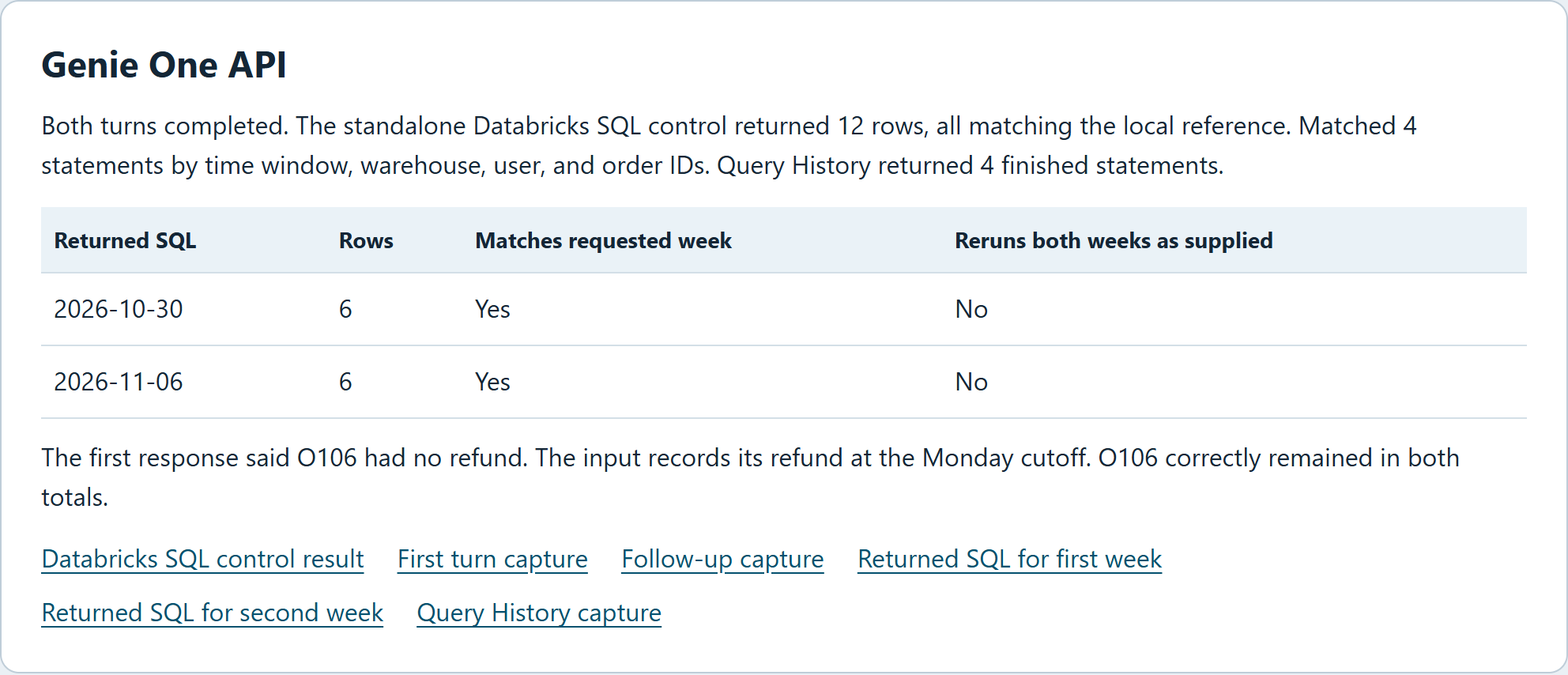
In our Genie One API walkthrough, we gave it sample orders for two reporting weeks. Genie One identified the two refunds behind the change and got the next week's regional breakdown right when we asked for it in a follow-up.
Databricks lists the Genie One API as a beta that a workspace admin must enable. To call a particular curated agent from an app, use the Genie Agents API.
When we traced Genie One's explanation back to sample order O106, we found a refund recorded exactly at the Monday cutoff. Genie One said the order had no refund. The report excluded only refunds recorded before the cutoff, so O106 belonged in both totals. Someone reading "no refund" could go looking for a missing transaction.
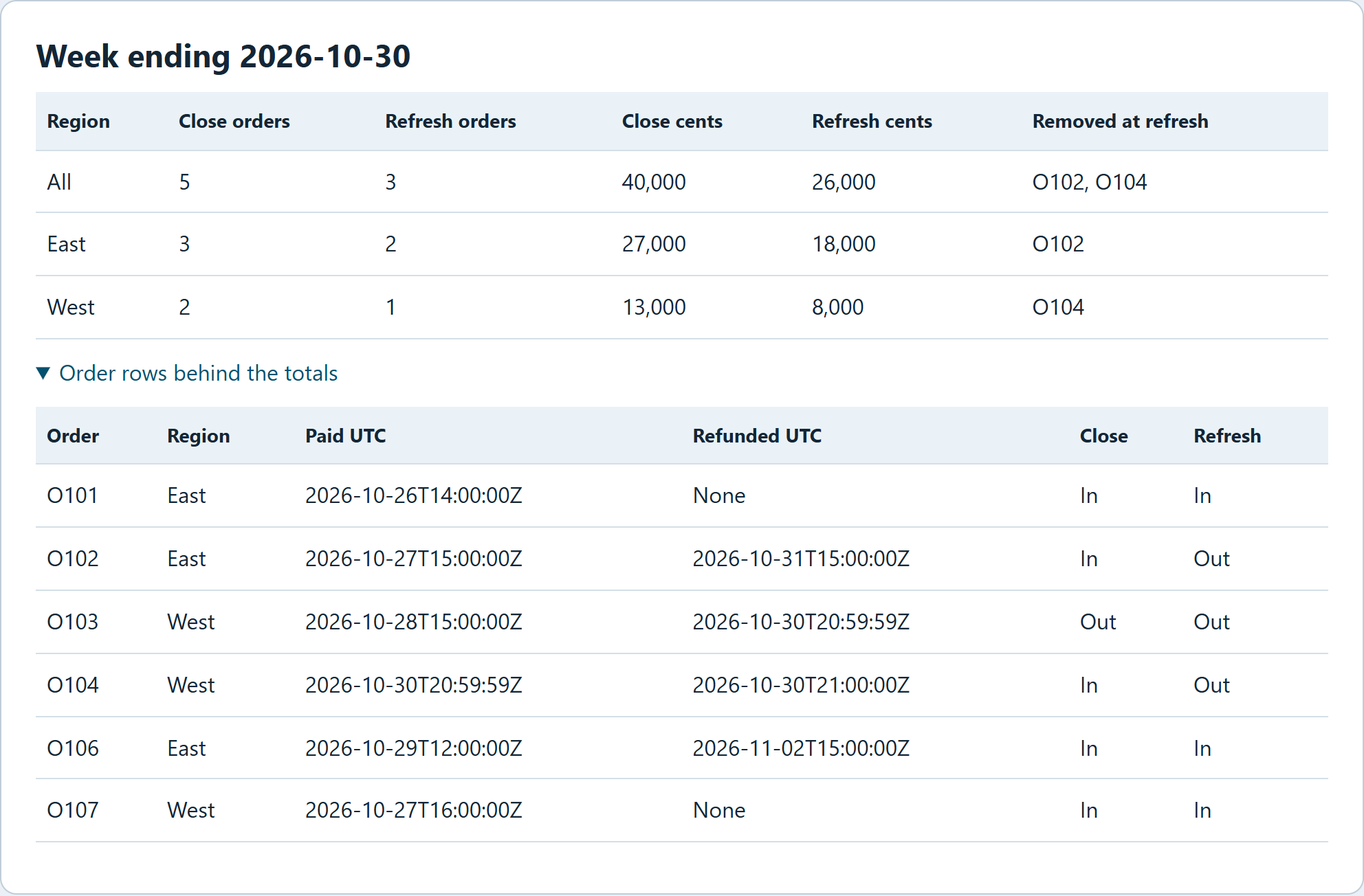
Query History showed four finished statements that matched the walkthrough. The replay used SQLite with the same sample orders.
When we reran the two SQL snippets Genie One returned, each reproduced the rows for the week it addressed. Both included the reporting date as a literal. I'd make it an input before asking someone to run the same query every Monday.
Genie Agents for questions a team asks again
A Genie Agent is a chat experience for a particular domain. An analyst curates its Unity Catalog datasets and adds example SQL, expressions, and instructions for the business terms users bring to it. The agent can return a result table, chart, and the query behind the answer. Genie One can bring a relevant agent into a conversation, and an application can call a particular agent through its API. Genie Agents API · Databricks Field Guide
I'd start with one definition. For a finance agent, that means specifying which paid orders belong in the reporting window and which refunds are visible at each cutoff, then putting that logic in a governed view or checked query the data owner can review. I'd include an order refunded exactly at the cutoff. A result can match last week's spreadsheet and still use the wrong definition for next week.
I built Prove It to help students read the SQL and understand the data before drawing a conclusion. The app shows the SQL it gets through the Genie Conversation API before revealing the result, so a student can see how the claim will be checked. See the source code.
I'd put the query next to a finance report so a reviewer can check the cutoff before signing off.
Genie Code for changing how data work runs
I'd bring in Genie Code once finance agrees that the report needs a change. The Genie Code documentation describes code generation and execution, notebook debugging, and work on pipelines and dashboards. It can use the table names and data lineage that the engineer has permission to see in Unity Catalog. For this report, the change I'd want to inspect is a single comparison in the SQL.
If finance decides to exclude orders refunded at the exact cutoff, I'd set Genie Code to Ask first before requesting an edit to the shared query. An exclusion predicate of refunded_at < cutoff keeps an order refunded at the cutoff in the count. Changing it to refunded_at <= cutoff excludes that order. Use refunds just before, at, and just after the cutoff to check the change.
The review workflow in Codex or Claude Desktop's Code view is a useful analogy. I'd check the diff for the change I asked for. With Genie Code, I'd do that work in the Databricks query or notebook.
The Genie names you'll run into next
If two reports use different definitions, I'd find the agreed rule before changing either query. Genie Ontology gives Genie One and Genie Code shared business context. Genie Search can search connected sources such as Google Drive and Jira.
If a report is stale, the first thing I'd check is when the job that feeds it last ran. Where available, Genie ZeroOps monitors jobs, pipelines, and tables. For a report moving from another data warehouse, Genie Migrate can convert its query to Databricks SQL. Comparing the old and converted queries on the same orders would show whether the move changed the total.
Where I'd start on Monday
I'd put the cutoff and the query beside the number finance signs off on, so the next reviewer can see which orders made the count. If finance chooses a different rule, I'd give engineering the order IDs that should move so they can check the new output. To reuse the agreed definition, I'd start with the Genie Agents documentation on creating and managing an agent.
Frequently asked questions
Are Genie Agents the same as Genie Spaces?
Yes. Genie Spaces is the former product name. Older examples and some API resource names still use the word "space."
Do I need to build a Genie Agent before I can use Genie One?
You can investigate with Genie One chat if the workspace has enabled it and you have permission to use at least one SQL warehouse, which runs the queries. Databricks calls that permission CAN USE. If chat is off, the Ask menu in the search bar lets you select an existing Genie Agent. Chat requirements · Genie One search and Ask
How do I open Genie One in my browser?
If Consumer access is your only workspace entitlement, Genie One opens when you sign in. With another workspace entitlement, you can get there from the app switcher or by adding /one to the workspace URL. Open Genie One
Can finance and engineering see the same evidence in Genie One?
To verify the figures at the source, each reviewer needs permission to open the assets you cite. Account-level Genie One can show shared assets across workspaces, and each reviewer needs Consumer access in the workspace whose data they want to see from that view. Genie One access and permissions