Databricks puts a table's schema on one tab, its grants on another, the job that writes it on a third, and the bill in a system table nobody queries until month-end. TechFabric Toolkit is a read-only Chrome extension that opens beside the Databricks page you're already on and pulls those answers into one drawer.
It works on AWS (*.cloud.databricks.com), Azure (*.azuredatabricks.net) and Google Cloud (*.gcp.databricks.com). Every workspace call stays between your browser and your own workspace, and 23 offline generators write Unity Catalog grants, Lakeflow expectations, Asset Bundle YAML and cost SQL without making a single network call.
Version 0.10.0Read-only REST & SQLZero telemetryFree
Each screenshot below was captured against a live Databricks workspace and our Databricks Field Guide MCP server. The extension reads the URL of the page you're viewing (Catalog Explorer, Jobs, SQL Editor, Query History, MLflow or Serving) and runs only the read-only checks that belong to that object.
Catalog Explorer · Tables
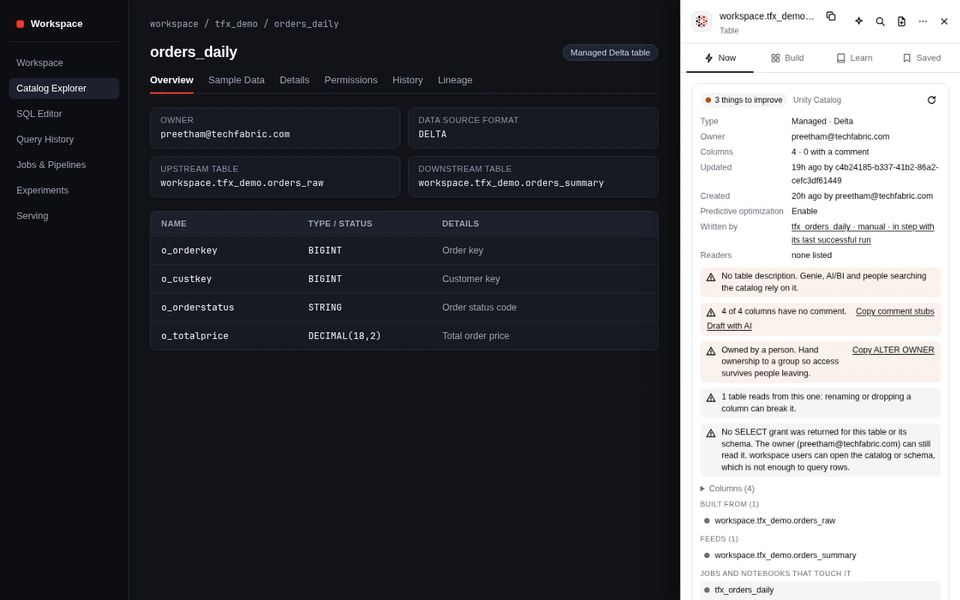
Unity Catalog table lineage, freshness and grants
Open a table in Catalog Explorer and the drawer checks who owns it, how many columns lack comments, whether the job that writes it succeeded or failed after the table's last commit, and who holds SELECT on the table, schema or catalog.
Lists upstream tables (Built from), downstream tables and views (Feeds), and the jobs and notebooks that touch the table.
DESCRIBE DETAIL + DESCRIBE HISTORY
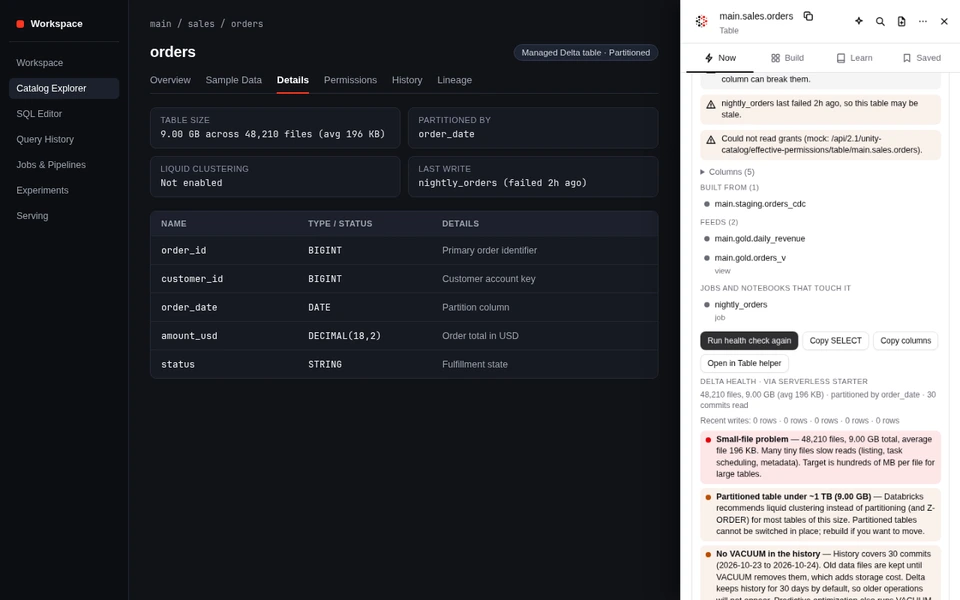
Delta table health check via SQL warehouse
Runs read-only DESCRIBE DETAIL and DESCRIBE HISTORY statements through your SQL warehouse. It flags small-file problems when average file size drops under 32 MB, partitioned tables under 1 TB that belong on liquid clustering, and tables with no VACUUM in the last 30 commits.
Generates ready-to-copy OPTIMIZE, Predictive Optimization and liquid clustering SQL for the current table.
Jobs & Pipelines · Run page
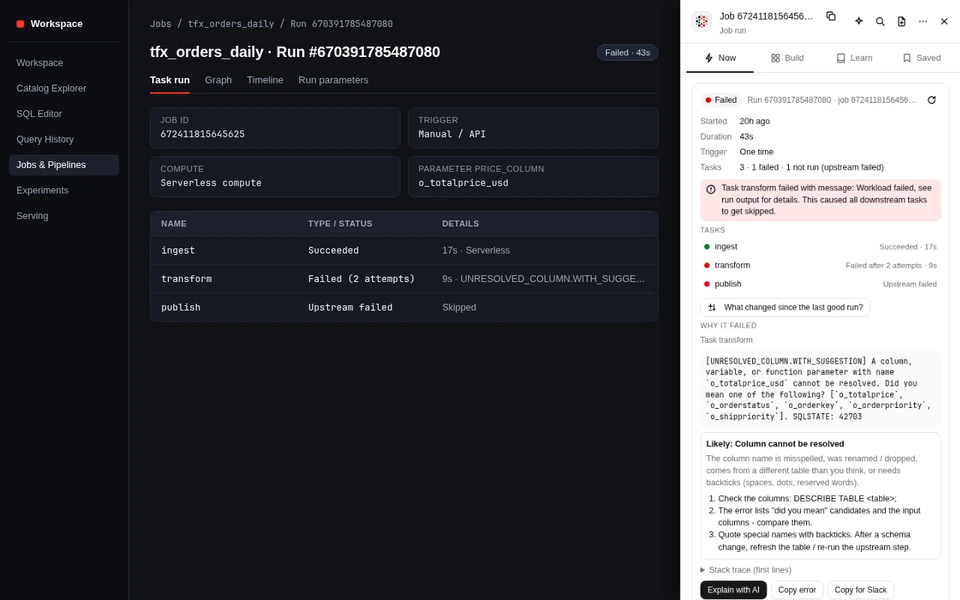
Failed job run triage and retry folding
When a multi-task run fails, Databricks' Runs API returns one entry per attempt, so a retried serverless task looks like two separate tasks. The drawer folds retries into one row per task, fetches the failed task's error output automatically, and decodes the Spark or Delta error class.
Includes one-click Copy error, Copy for Slack, and Explain with AI using your workspace's own serving endpoint.
Jobs & Pipelines · Run comparison
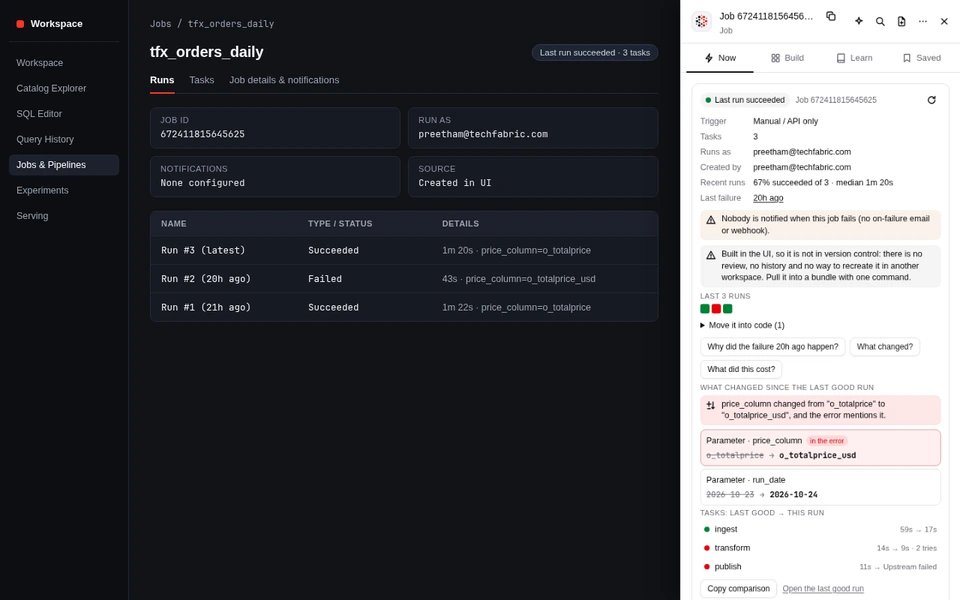
What changed since the last good run?
Finds the newest succeeded run that started before the failed run and diffs parameters, notebook or wheel versions, cluster and serverless settings, environment dependencies and task topology. If a changed parameter appears in the error text, it's flagged at the top as the primary suspect.
Shows task-by-task duration diffs between the last good run and the failed run.
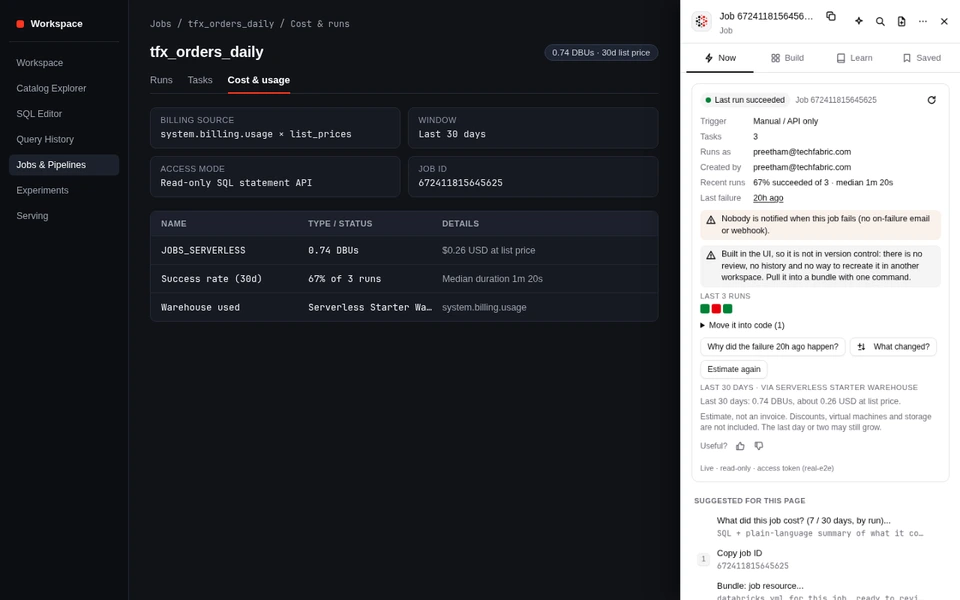
system.billing.usage · Asset Bundles
30-day list-price cost and bundle provenance
Estimates what the current job, SQL warehouse or serving endpoint cost over the last 30 days by joining system.billing.usage to system.billing.list_prices. On jobs deployed from a Databricks Asset Bundle, it also shows the Git repository, branch, commit SHA and databricks.yml path.
On UI-built jobs that aren't in Git yet, it gives you the exact databricks bundle generate command to pull the job into code.
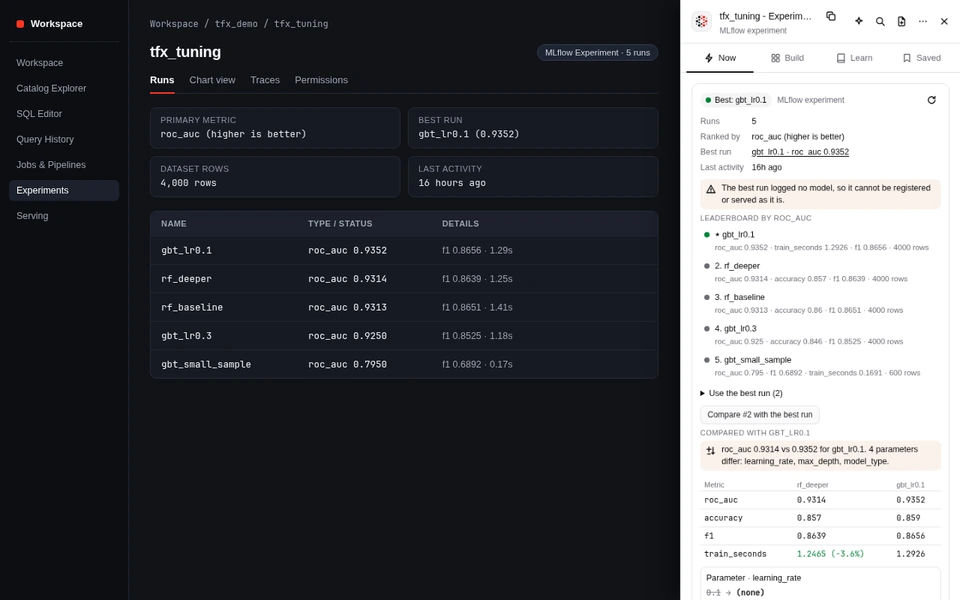
Experiments · MLflow
MLflow experiment leaderboard and run diff
Ranks finished runs in the current MLflow experiment by your primary test or validation metric, flags when the top run didn't log a model artifact, and compares runner-up runs against the best run across metrics and hyperparameters.
Generates the Python mlflow.register_model snippet to register the winning run to Unity Catalog.
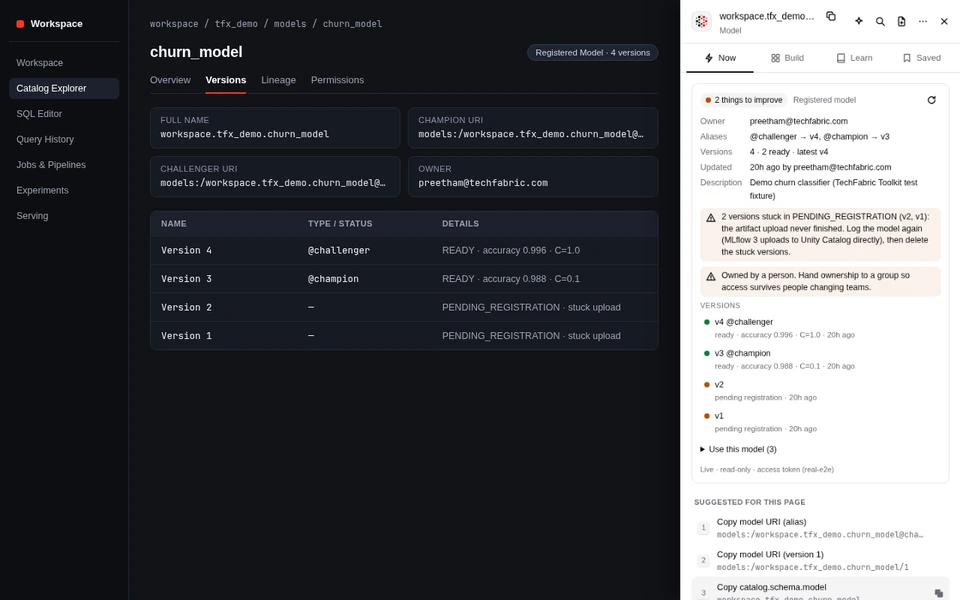
Catalog Explorer · Models
Registered model aliases, metrics and stuck uploads
Shows which version holds @champion and @challenger, pulls the training run's logged metrics and parameters onto each version row, and warns when model versions are stuck in PENDING_REGISTRATION after an interrupted upload.
Includes ready-to-copy models:/catalog.schema.model@champion URIs for batch scoring and serving.
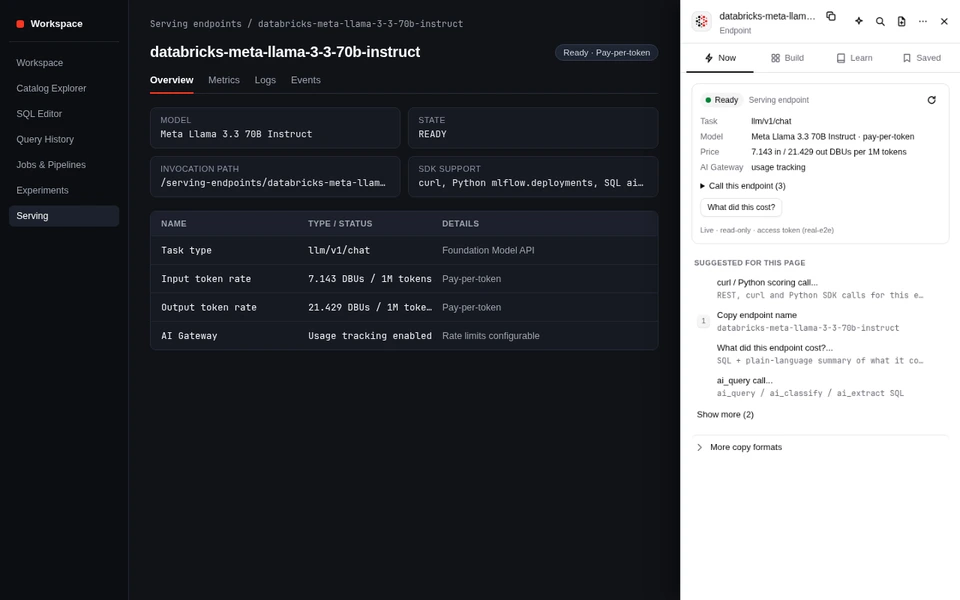
Serving · Foundation & custom models
Serving endpoint token rates, AI Gateway and calling code
Reads the endpoint's task type, served models, scale-to-zero configuration, pay-per-token DBU rates and AI Gateway settings (usage tracking, rate limits, guardrails, payload logging and fallbacks).
Gives you copyable curl, Python mlflow.deployments and SQL ai_query calls prefilled with the endpoint name.
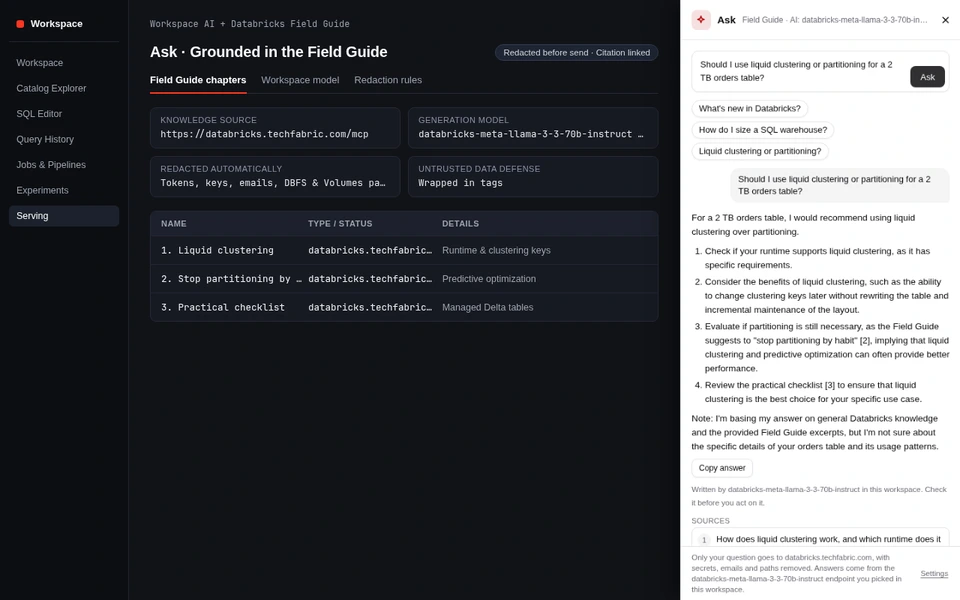
Ask · Grounded answers
Ask the Databricks Field Guide and your workspace model
Ask a Databricks question from any tab. The extension searches the public Databricks Field Guide (databricks.techfabric.com/mcp) for the relevant sections and, if you pick a chat endpoint in your own workspace, grounds the model's answer in those excerpts with clickable citations.
Tokens, keys, emails, and DBFS or Volumes paths are stripped from your question before it leaves the browser.
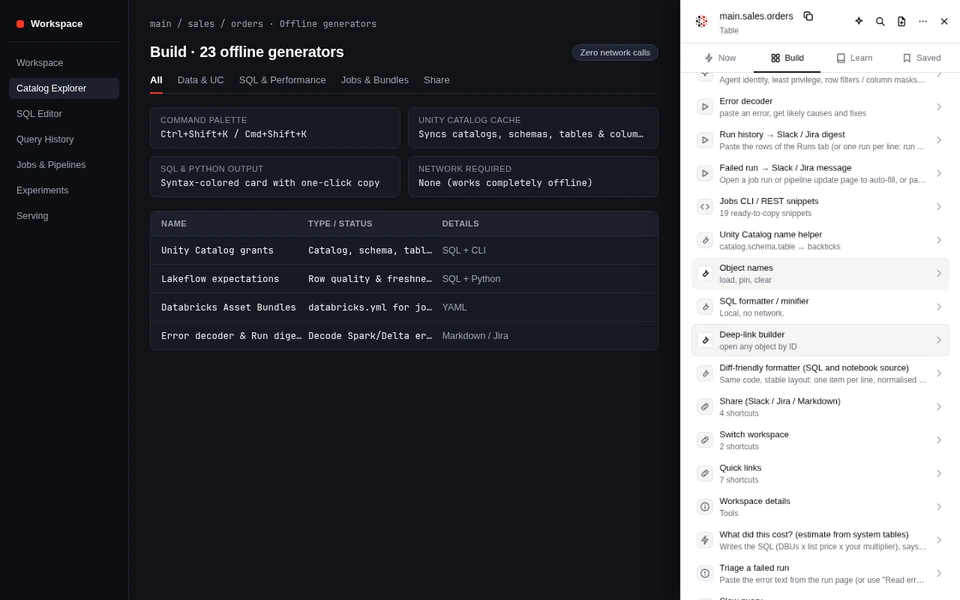
Build · Ctrl+Shift+K / Cmd+Shift+K
23 offline generators and the Command Palette
Every generator in the Build tab runs locally in the browser with zero network calls: Unity Catalog GRANT and REVOKE statements, row filters and column masks, Lakeflow data quality expectations, Databricks Asset Bundle YAML, SLA and cost SQL, error decoding, and Slack or Jira run digests.
Press Ctrl+Shift+K (or Cmd+Shift+K on macOS) to search your synced Unity Catalog catalogs, schemas, tables and columns with live SQL previews.
Get started in 60 seconds
Install TechFabric Toolkit in Chrome
Works in Google Chrome, Brave, Microsoft Edge and Arc. Download the signed release archive below and load it in developer mode, or install from the Chrome Web Store once the listing review finishes.
Step 1
Download the extension archive
Download techfabric-toolkit-0.10.0.zip from this page and unzip it into a folder on your machine (for example, ~/techfabric-toolkit).
Step 2
Open Chrome Extensions
Navigate to chrome://extensions in Google Chrome, Brave, Microsoft Edge or Arc, and turn on the Developer mode toggle in the top-right corner.
Step 3
Load unpacked
Click Load unpacked in the top-left corner and select the unzipped folder. Pin TechFabric Toolkit for Databricks in your browser toolbar.
Step 4
Open any Databricks workspace tab
Visit your workspace on *.cloud.databricks.com, *.azuredatabricks.net or *.gcp.databricks.com. Click the pill on the right edge (or press Alt+Shift+D) to open the drawer.
Click Use browser sign-in inside the drawer. The extension reuses the cookies of your active Databricks tab for same-origin GET requests to Unity Catalog, Jobs, Pipelines, Clusters, Warehouses, MLflow and Serving. No token is created or stored.
2 · Access token or Entra ID OAuth token
For SQL warehouse checks
Databricks blocks browser-cookie POST calls to /api/2.0/sql/statements. To run Delta table health checks (DESCRIBE DETAIL) and 30-day cost estimates (system.billing.usage), paste a Personal Access Token or a 2,500-character OAuth / Entra ID token from databricks auth token. It is stored in the service worker's IndexedDB vault.
Build tab · Works offline
23 generators that run without a network call
Even if you never connect the live REST API, the Build tab and the Command Palette (Ctrl+Shift+K or Cmd+Shift+K) prefill every generator from the URL and title of the Databricks page you have open.
Unity Catalog & Governance
Generator
Output
What it produces
Unity Catalog grants
SQL + CLI
Least-privilege GRANT and REVOKE bundles for catalogs, schemas, tables, volumes and functions, with schema-level USE_CATALOG pitfalls avoided.
Row filter & column mask
SQL
CREATE FUNCTION and ALTER TABLE templates for row-level security and column masking by group.
AI agent governance
SQL + Python
Service principal grants, Unity Catalog tool functions and least-privilege access for AI agents.
Table helper & comment stubs
SQL
SELECT, DESCRIBE, SHOW GRANTS, ALTER TABLE OWNER and escaped COMMENT ON COLUMN statements.
Unity Catalog name helper
SQL
Converts between three-part names, backtick-quoted identifiers and Catalog Explorer paths.
Jobs, Pipelines & Bundles
Generator
Output
What it produces
Databricks Asset Bundle generator
YAML
Generates databricks.yml for jobs and Lakeflow pipelines, converting standard cron expressions to Quartz weekday numbering.
Lakeflow expectations
SQL + Python
DLT and Lakeflow data quality constraints (warn, drop, fail) and separate freshness checks that never drop historical rows.
Triage a failed run
Checklist + SQL
Decodes Spark, Delta, OOM and permission errors into likely causes and remediation commands.
Run history & failed-run digests
Slack / Jira / Markdown
Formats job run tables and failure summaries into compact updates for incident channels.
Jobs CLI & REST snippets
Bash + curl
19 ready-to-copy Databricks CLI v0.200+ and REST API 2.1/2.2 commands prefilled with your current object ID.
SQL, Performance & Cost
Generator
Output
What it produces
What did this cost?
SQL
System-table billing queries joining system.billing.usage and list_prices by job, warehouse, endpoint, SKU or identity.
Slow query checklist
SQL + Guide
Diagnoses disk spill, shuffle skew, Photon coverage and warehouse queue wait from Query History metrics.
Table SLA & freshness check
SQL
Checks whether a table's latest commit or timestamp column is within its expected SLA window.
SQL & Python diff-friendly formatter
SQL / Python
Formats SQL and notebook source locally with zero network calls and syntax-colored output cards.
Migration & Airlift sizing
Checklist + SQL
Pre-migration inventory queries and cutover checklists for moving warehouse tables into Unity Catalog.
Security & privacy architecture
Enforced read-only at the network boundary
Your Databricks browser tab (Catalog Explorer, Jobs, SQL Editor, MLflow, Serving) hosts the TechFabric Toolkit drawer with its four tabs (Now, Build, Learn, Saved). The 23 SQL, Python, YAML and CLI tools in Build make no network calls. Live workspace checks use same-origin read-only REST API calls (GET, DESCRIBE, SHOW and system.billing) with your session cookie or vaulted token.
When you use Ask or Learn, questions go to databricks.techfabric.com/mcp only after secrets, emails and paths are redacted. If you enable AI in Settings, your own workspace serving endpoint can explain failed runs and draft column comments inside your tenant.
Every workspace API request stays between your browser tab and the Databricks workspace you already have open. Only optional Field Guide searches reach databricks.techfabric.com, after secrets and paths are redacted.
Allow-listed REST & SQL
No writes can leave the client
src/lib/api.js blocks every HTTP method except GET, POST /api/2.0/mlflow/runs/search and POST /api/2.0/sql/statements. SQL statements are stripped of backtick-quoted identifiers and verified to start with DESCRIBE or SHOW (or match one of the four exact system.billing.usage cost queries) with zero semicolons, SQL comments or DDL/DML keywords.
Service-worker token vault
Tokens stay out of page scripts
Access tokens are written straight to the extension service worker's IndexedDB database (tfx_vault) before workspace metadata is saved to chrome.storage.local. Tokens are never placed in chrome.storage.sync or DOM storage, and every action button checks event.isTrusted so a notebook or page script cannot trigger requests.
Fail-closed redaction
Secrets stripped twice
Before a question is sent to the public Field Guide (databricks.techfabric.com/mcp), redactText strips Databricks tokens (dapi...), bearer headers, AWS keys, PEM blocks, key-value secrets, email addresses, and dbfs:/, /Volumes/ or cloud storage URIs at both the UI layer and the network boundary.
Keyboard navigation
Built for keyboard-first workflows
Alt + Shift + D
Option + Shift + D
Toggle the right-hand toolkit drawer on any Databricks tab.
Ctrl + Shift + K
Cmd + Shift + K
Open the Command Palette to search tools and synced Unity Catalog tables.
Alt + Shift + C
Option + Shift + C
Copy the primary identifier (table name, job ID, run ID or endpoint name) for this page.
1 / 2 / 3
When drawer is focused
Copy the first, second or third suggested action on the Now tab.
Works alongside the toolkit
More Databricks tools from TechFabric
Free manual
The Databricks Field Guide
The same reference chapters that power the extension's Learn and Ask tabs, covering Unity Catalog, Lakebase, Lakeflow, liquid clustering, model serving and pricing.
Connect Claude Code, Codex, Cursor or VS Code to databricks.techfabric.com/mcp for grounded Databricks answers, bundle reviews and interactive concept cards.
Want our engineers to run a full workspace audit across system.billing, job reliability, cluster sizing and Unity Catalog grants? Fixed fee, two weeks, and a severity-ranked scorecard.
Does the extension ever modify my Databricks workspace or run writes?+
No. Every workspace request goes through a strict read-only gate in src/lib/api.js. Only GET requests to allow-listed REST API paths (/api/2.0/, /api/2.1/, /api/2.2/), POST search queries to /api/2.0/mlflow/runs/search, and single read-only SQL statements (DESCRIBE, SHOW, and the fixed system.billing.usage cost SELECT) are permitted.
Any DDL, DML, semicolon-chained statement or comment-injected query is refused in the browser before a network call can be made.
Where is my Databricks access token stored?+
If you use your existing browser session, no token is needed at all: the extension sends same-origin GET requests using your active Databricks tab session.
If you choose to add a Personal Access Token or an OAuth / Microsoft Entra ID token for SQL warehouse queries, the token is stored in the extension service worker's isolated IndexedDB vault (never in page-accessible DOM storage and never synced to Google).
Does the extension send telemetry or workspace data to TechFabric?+
There is no analytics, telemetry or tracking beacon in the extension. Workspace API calls go straight from your browser to the Databricks workspace host you already have open, and cross-workspace requests are blocked.
Only two optional actions ever contact databricks.techfabric.com: searching the public Databricks Field Guide when you use Learn or Ask (with tokens, keys, emails and file paths redacted twice before sending), and submitting the optional feedback form when you click Send yourself.
How do I use AI features like Explain with AI and Draft column comments?+
AI is off by default. In the extension's Settings sheet, you can pick a chat model serving endpoint that already runs inside your own Databricks workspace (such as databricks-meta-llama-3-3-70b-instruct or databricks-claude-3-7-sonnet).
Prompts are sent directly to that endpoint in your workspace, with untrusted log and metadata strings wrapped in <untrusted_workspace_data> tags, and drafted column comments are returned as escaped ALTER TABLE ... ALTER COLUMN ... COMMENT statements for you to review rather than executed automatically.
Which Databricks clouds and URLs does it support?+
It runs on AWS (*.cloud.databricks.com), Azure Databricks (*.azuredatabricks.net) and Databricks on Google Cloud (*.gcp.databricks.com), across both classic and new workspace URL schemes (Catalog Explorer, Jobs & Pipelines, Lakeflow pipelines, SQL Editor, Query History, Notebooks, Clusters, SQL Warehouses, MLflow Experiments, Registered Models, Vector Search and Serving Endpoints).
Can I use it offline without connecting to the workspace REST API?+
Yes. All 23 generators in the Build tab, the error decoder, the SQL and Python formatters, the deep-link builder, the Learn tab links and the Saved snippets tab work locally with zero network requests.