

Two invoice lines of 0.015 total 0.04 when each line is rounded to cents, and 0.03 when only the invoice total is rounded. Every amount in that calculation used a decimal type. The difference shows up when finance compares a report with the amounts actually billed.
At TechFabric, we'd agree the rounding policy with finance before accepting a monetary calculation in Databricks SQL. We'd test where rounding happens and how rejected amounts affect the reported total, alongside the numeric type.
We ran these checks as synthetic SQL in Databricks Free Edition on SQL warehouse version 2026.44, once with the strict ANSI mode switched on and once with it off. We didn't touch a customer ledger or a production report.
Precision through the calculation
The DECIMAL type stores base-ten numbers with a maximum total digit count, called precision, and a fixed number of fractional places, called scale. In DECIMAL(18,4), that means 18 digits in total with four after the decimal point, which leaves 14 for the whole part. Choosing a scale of two when the data is first loaded would already round away fractions that a later calculation might use.
We'd keep the precision that rates and intermediate amounts need and round only at the step finance has agreed. DOUBLE works differently. It uses binary floating point, which can't represent many decimal fractions exactly, and mixing it into a decimal calculation can change the result type, so we'd check the expression as well as the stored column.
SELECT
  typeof(CAST('12.3456' AS DECIMAL(18,4))
       * CAST('0.082500' AS DECIMAL(9,6))) AS product_type,
  CAST('12.3456' AS DECIMAL(18,4))
    * CAST('0.082500' AS DECIMAL(9,6)) AS product,
  typeof(CAST('12.3456' AS DECIMAL(18,4)) + 0E0) AS mixed_type;
The product came back as DECIMAL(28,10) with a value of 1.0185120000. Adding the DOUBLE literal zero to the same decimal amount turned that expression into a DOUBLE. We'd keep that type in a test we rerun after every change, because the displayed value can look harmless while the type underneath has changed.
Using the maximum precision everywhere can also reduce the fractional detail kept during arithmetic. In a separate probe, multiplying two DECIMAL(38,10) values of 0.1234567890 produced DECIMAL(38,6), with a result of 0.015242. DECIMAL supports at most 38 digits, so we'd test intermediate results at the precision we actually chose instead of assuming a wider declaration keeps every fraction.
Rounding method and rounding stage
Databricks has two tie rules for an amount that sits exactly halfway. ROUND uses HALF_UP, which rounds that value away from zero. BROUND uses HALF_EVEN, which rounds it toward the nearest result whose final retained digit is even. We'd use whichever one finance has agreed to.
| Decimal input | ROUND to two places | BROUND to two places |
|---|---|---|
| -1.015 | -1.02 | -1.02 |
| -1.005 | -1.01 | -1.00 |
| 1.005 | 1.01 | 1.00 |
| 1.015 | 1.02 | 1.02 |
The stage of rounding can change totals whatever the tie rule.
Rounding each 0.015 line with HALF_UP and then adding gave 0.04 in our probe, while adding the unrounded lines first and rounding once gave 0.03.
WITH lines AS (
  SELECT CAST(raw AS DECIMAL(8,3)) AS amount
  FROM VALUES ('0.015'), ('0.015') AS input(raw)
)
SELECT sum(round(amount, 2)) AS rounded_lines,
       round(sum(amount), 2) AS rounded_invoice
FROM lines;
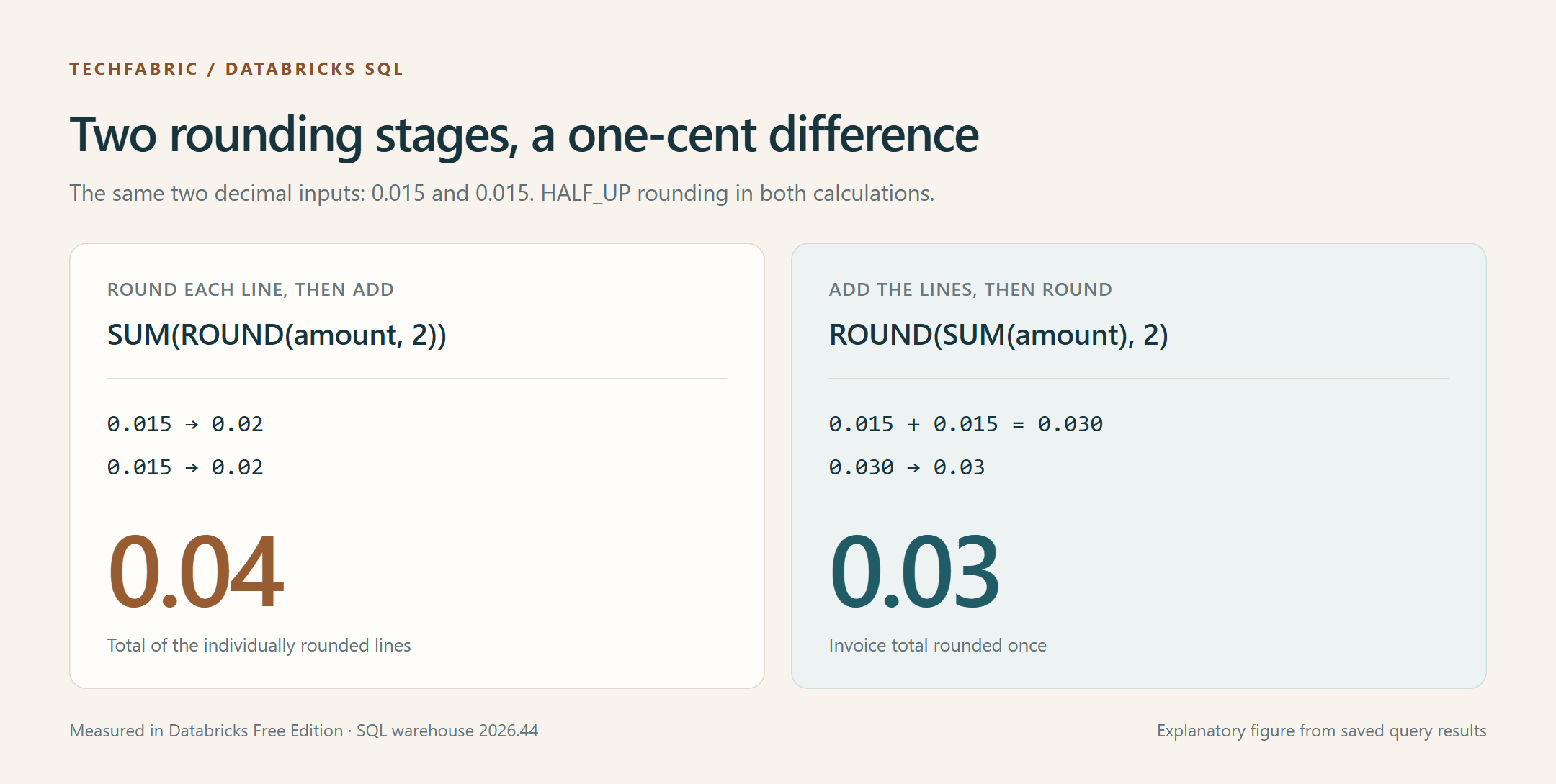
Each total is correct for the rule that produced it, so we'd ask finance which one should match the billing system and record that answer as the expected result in the test. We included negative halfway values in the tie test because credits are rounded too, and ROUND moved -1.005 to -1.01 where BROUND gave -1.00.
Overflow with ANSI mode
ANSI mode controls how Databricks SQL deals with certain arithmetic operations and type conversions. We'd switch it on explicitly in the reporting session, so an ordinary CAST that exceeds its destination range stops the query. Databricks documents the ANSI_MODE setting for Databricks SQL, and refers to a separate article for ANSI compliance in Databricks Runtime.
Casting the text 999.995 to DECIMAL(5,2) exposed the boundary. That type holds amounts up to 999.99, but rounding the input would produce 1000.00. With ANSI on, the cast raised a numeric out-of-range error. With ANSI off, it returned NULL, SQL's marker for a missing value. The nearby input 999.994 converted to 999.99 in both modes. ANSI mode doesn't reject every loss of fractional detail. Both CAST and TRY_CAST converted 1.005 to 1.01 at scale two in both modes. If finance requires HALF_EVEN, we'd apply BROUND while the extra decimal places are still there, before the final cast.
Rejected amounts alongside the total
Tolerant conversion is useful when a load should collect bad inputs for review. TRY_CAST returns NULL for malformed text or for an amount that can't fit the target DECIMAL type. Because SUM ignores NULL inputs, the total then covers fewer rows than the incoming file did.
WITH parsed AS (
  SELECT try_cast(raw AS DECIMAL(5,2)) AS amount
  FROM VALUES ('10.005'), ('999.995'), ('invalid') AS input(raw)
)
SELECT count(*) AS input_rows,
       count(amount) AS accepted_rows,
       count_if(amount IS NULL) AS rejected_rows,
       sum(amount) AS accepted_total
FROM parsed;
This query returned three input rows, one accepted row, two rejected rows and an accepted total of 10.01 in both modes. We'd keep the original rejected values for repair and leave that total out of any complete-file report until those rows are fixed, because replacing the NULLs with zero would hide the amounts that failed conversion.
The reporting decision we'd propose starts with that count of accepted and rejected rows, which we call a conversion audit. If any rows were rejected, we'd hold the report for repair. If none were, we'd reconcile the accepted total against the amount finance expects. We'd put that decision next to the total, so a query that runs without errors can't quietly approve an incomplete report.
We'd start with one calculation that finance can explain from the source amounts all the way to the billed total. Then we'd record the expected amounts and the rejection count, and rerun the same cases whenever someone changes the SQL types or the rounding logic.
Frequently asked questions
Is DECIMAL(18,2) enough for money?
It can suit a final amount with two decimal places if its range is big enough. We'd check both the largest single amount we expect and the largest total, and we'd choose the types for rates and intermediate calculations separately.
Does ANSI mode enforce the rounding policy?
No. ANSI mode still allows ordinary rounding when a cast drops decimal places, so we'd test finance's policy separately and rerun those cases after a warehouse upgrade.
What happens if every conversion fails?
SUM returns NULL when all its inputs are NULL. We'd keep the input and rejection counts next to that result, so a fully rejected file can be told apart from an empty one.