


If your team's reports depend on Databricks tables, you need to know which bad records your data quality checks would stop. A data quality suite can pass every day and still miss a duplicate order or a missing order. To find out what the rules can detect, give them defects with known answers. This post shows how to do that with a kill matrix, and what each layer of checks adds.
A kill matrix records which deliberately injected defects each rule or rule set catches. Here, "killed" means detected. The technique borrows from mutation testing, but changes the input data while keeping the checks fixed.
After writing data quality checks in Databricks, test the checks themselves.
The test contract and fixture
Use four synthetic orders and two customers, with money in integer cents. Define the contract:
- Order and customer IDs are required; order IDs are unique and customers must exist.
- Amounts are positive and at most 100,000 cents. Status is
PAIDorPENDING. - Quantity and unit price are positive; line amount equals quantity × unit price.
- The complete batch contains four orders totaling 100,000 cents, as specified by an independent source manifest.
Reset to the clean fixture before each defect. For example, duplicate an existing ID without adding a row, or remove one order.
Keep valid controls: the baseline plus allowed changes to status, customer, and quantity/price. A suite that rejects everything would catch every defect and be useless.
The kill matrix and its results
Compare three cumulative suites:
- Row rules: required order and customer IDs, amount bounds, and allowed status.
- + Relations/math: all row rules, plus unique order IDs, existing customers, positive quantity and unit price, and matching line arithmetic.
- + Batch checks: all preceding checks, plus reconciliation against the manifest's order count and total.
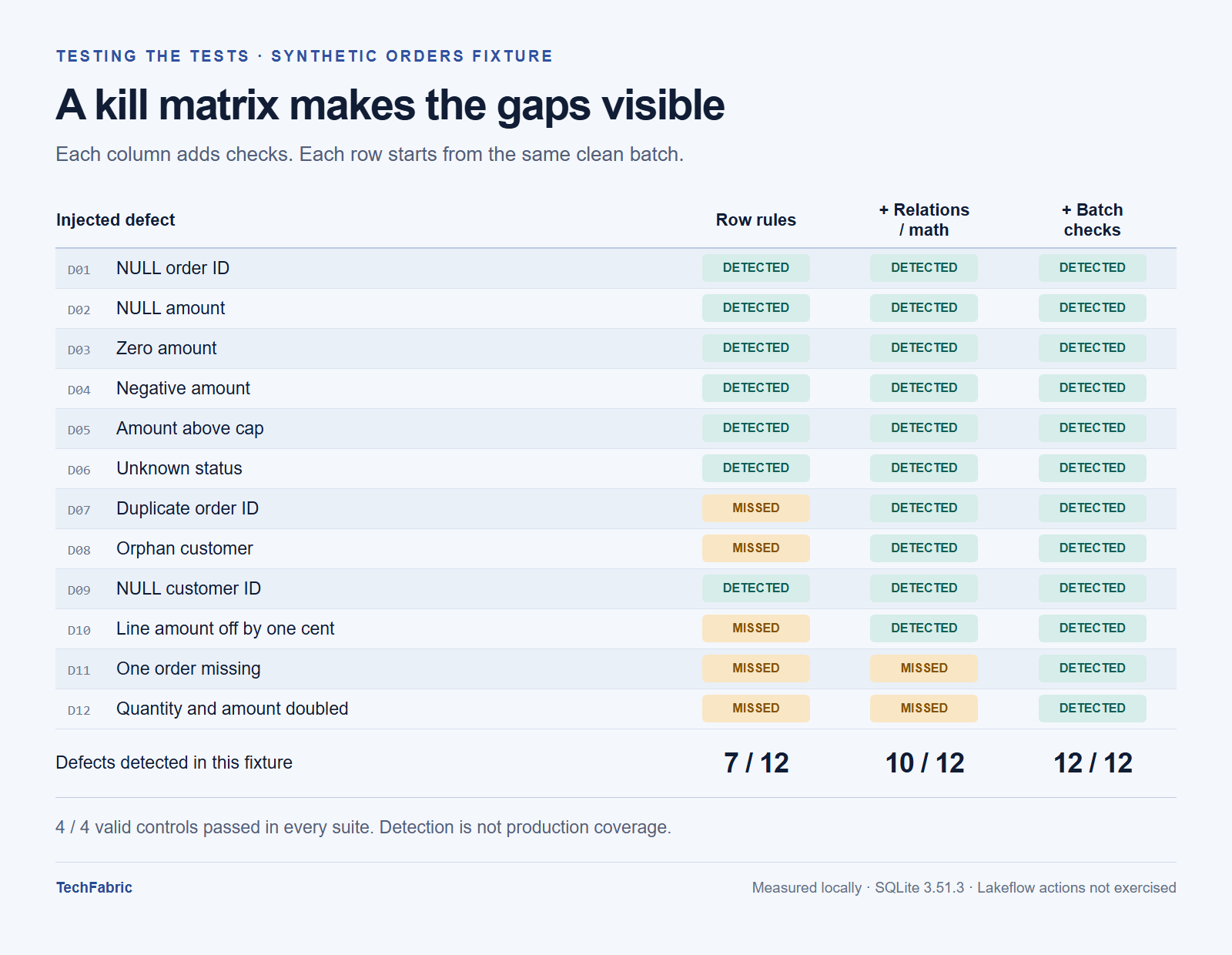
In a local SQLite 3.51.3 run, the suites detected 7/12, 10/12, and 12/12 defects. All four valid controls passed every suite. These measurements cover predicate detection on this fixture; Databricks execution and Lakeflow actions require separate runs. They do not measure production defect coverage.
The survivors explain what each layer adds. Row rules miss duplicate IDs, unknown customers, and incorrect line arithmetic; the second suite catches all three. A missing order and doubled quantities and amounts survive until batch reconciliation. In the latter case, every line still balances, but the batch total exceeds the manifest.
Keep the source manifest independent: calculating the expected total from the corrupted target defeats the check. Compare the same batch or snapshot, accounting for legitimate filtering or aggregation.
NULL handling in invalid-row checks
Hand-written invalid-row queries deserve their own defect cases. This query fails to identify a missing amount:
SELECT * FROM orders

WHERE NOT (amount_cents > 0);
For NULL, the comparison and its negation are unknown. A WHERE clause keeps only true conditions. Write the invalid condition explicitly:
SELECT * FROM orders

WHERE amount_cents IS NULL OR amount_cents <= 0;
The local probe finds zero violations with the first condition and one with the second, consistent with Spark SQL NULL semantics. This tests a custom invalid-row query, not a Lakeflow action.
For a Lakeflow dataset, express the complete valid condition in its definition:
CONSTRAINT valid_amount EXPECT (

amount_cents IS NOT NULL

AND amount_cents > 0

AND amount_cents <= 100000

) ON VIOLATION FAIL UPDATE
This fragment belongs inside a dataset definition. Keep zero and NULL as separate cases so each boundary has a clear result.
Detection and the warn, drop and fail actions
Run each defect through the actual transformation path in a test environment. Confirm it reaches the intended check; upstream removal leaves that check untested.
The observable result depends on the expectation policy. Capture this evidence for each one:
warn: the invalid row remains and the named expectation records a violation.drop: the invalid row disappears, the valid control remains, and drop metrics agree.fail: the intended flow reports an expectation violation; a permission or source error does not count.
The pipeline UI shows expectation tracking metrics for warn and drop. A fail expectation fails the update when it detects an invalid record, so its metrics are not recorded. In a triggered pipeline, other parallel flows can continue. See the expectation documentation.
For uniqueness, references and totals, compute joins or aggregates in a validation dataset. An expectation constraint cannot contain a subquery that references another table. To block publication, use separate validation and publication pipelines with an explicit success dependency between their tasks. A validation table alone does not provide that gate. See validation tables and pipeline control flow.
Recording and rerunning the matrix
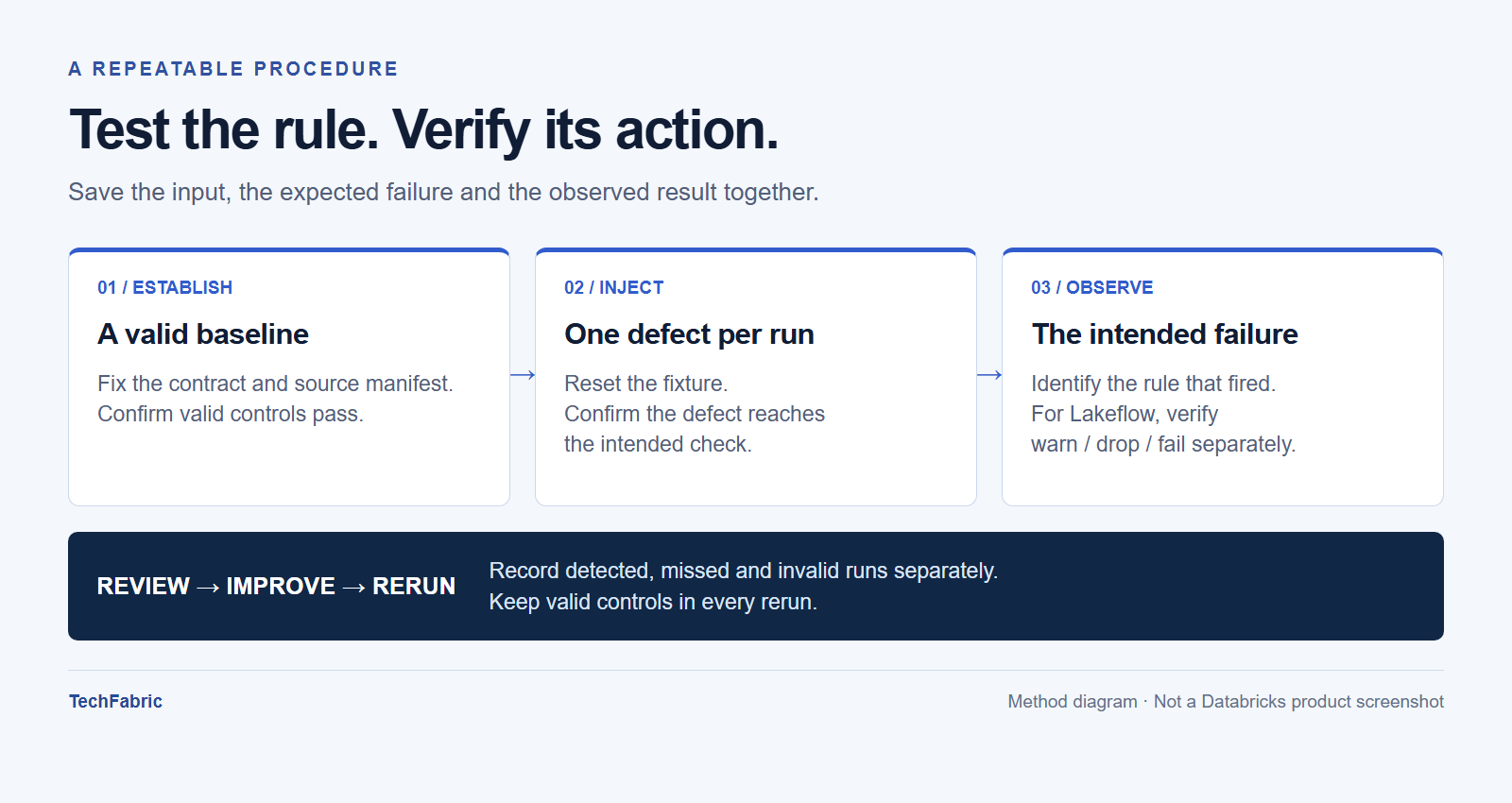
Save the fixture, defect ID, rule version, expected failure and observed result. Separate execution errors and cases that never reached the check from detected and missed defects.
Check the intended rule as well as the suite. The one-cent arithmetic defect also breaks the batch total; reconciliation alone could conceal a broken arithmetic check.
Rerun when predicates, transformations or actions change. Require every designated critical defect to be detected and every valid control to pass. Review each survivor before accepting it.
Start with failures that would change a business decision: a duplicate order, an unknown customer, a lost record, an inflated total. Add defects for your own data contract. Before a rule ships, commit the data that must break it.
Frequently asked questions
Does a clean kill matrix mean my data quality rules are complete?
No. The matrix only covers the defects you chose to inject, so it says nothing about defects you never thought of. The post's results come from one fixture and measure predicate detection, not production coverage.
Can I run the same matrix against a Lakeflow pipeline instead of SQLite?
Yes, but it needs its own run, because the SQLite results don't carry over to Databricks execution or to the warn, drop and fail actions. Send each defect through the real transformation path in a test environment. Then check what each action should leave behind: the row stays with a recorded violation for warn, the row disappears for drop, and the update fails for fail. Keep execution errors, such as a permission problem, apart from defects that were caught.
Why can't I put a uniqueness or total check straight into an expectation constraint?
A constraint can't contain a subquery that references another table. Uniqueness, references and totals therefore need a validation dataset that computes the join or aggregate first, with the expectation sitting on its result. That dataset won't stop downstream tables from updating on its own. To block publication, put validation and publication in separate pipelines and make the publication task depend on the validation task.
Why does the NULL amount slip through the first query?
NOT (amount_cents > 0) evaluates to unknown when the amount is NULL, and a WHERE clause keeps only rows where the condition is true. The row is never returned. Writing amount_cents IS NULL OR amount_cents <= 0 makes the missing value an explicit violation.