

An order with a missing value can disappear from both the accepted-data query and the error report. SQL represents an unknown result as NULL; negating that result doesn't turn it into a failure.
At TechFabric, we'd accept a required value only when its rule returns TRUE, and keep rejected orders available for repair. Take an order whose code is exactly three digits from 0 to 9 and whose quantity arrives as text representing a positive whole number. We'd test those requirements with deliberately invalid inputs before relying on the error count.

Where NULL disappears
A manual error report often negates the validation condition. Negating a NULL result still gives NULL, and SQL's WHERE clause selects rows whose condition is TRUE. Both the accepted-row query and its negated error query can therefore omit the same row. Databricks documents these NULL semantics.
The same NULL problem appears in our data-quality test against twelve defects. For a required value, an unknown result counts as a failure. The SQL function coalesce uses the first non-null argument, so this error query includes false and unknown results:
SELECT case_id FROM evaluated_rules
WHERE NOT coalesce(raw_ok, false)
ORDER BY case_id;
We ran the same 13 synthetic orders in local Apache Spark 4.0.1 and a Databricks Free Edition SQL warehouse reporting version 2026.44. Eleven orders deliberately violate the requirements; two valid orders check that correct data still passes.
| Required value | Valid inputs | Inputs the rule should reject |
|---|---|---|
| Code: exactly three digits from 0 to 9 | 123, 001 |
NULL, empty text, spaces, A123Z, 1234, 123 followed by a newline |
| Quantity: text convertible to a positive integer | '12', '7' |
NULL, 'twelve', '0', '1.5', '9999999999999999999999' |
The original rule checked the code's pattern and converted the quantity to an integer. With ANSI mode disabled, four violations disappeared from the negated error query in both environments: a missing code, a missing quantity, malformed number text and a number too large for the target type. Including unknown results recovered those four, but it couldn't catch invalid values whose rules returned true.
| Environment | Violations reported by the original query | After including unknown results | Invalid orders still accepted |
|---|---|---|---|
| Local Spark 4.0.1 | 5 of 11 | 9 of 11 | 2 |
| Databricks SQL 2026.44 | 6 of 11 | 10 of 11 | 1 |
The newline after the code
A regular expression describes a text pattern. Finding three digits somewhere in a string doesn't establish that the whole value contains exactly three digits. Java's $ can match immediately before a final line terminator, and Databricks documents Java regex syntax. For a code whose entire value matters, we'd use \A for the absolute start and lowercase \z for the absolute end. Databricks regex syntax, Java boundary behavior.
The newline exposed a difference between our executions. The dollar-anchored pattern accepted 123 followed by a newline in local Spark and rejected it in the tested Databricks SQL warehouse. The pattern bounded by \A and \z rejected it in both. We confirmed that the warehouse input contained all four characters, including the final line feed, shown as LF in the figure.
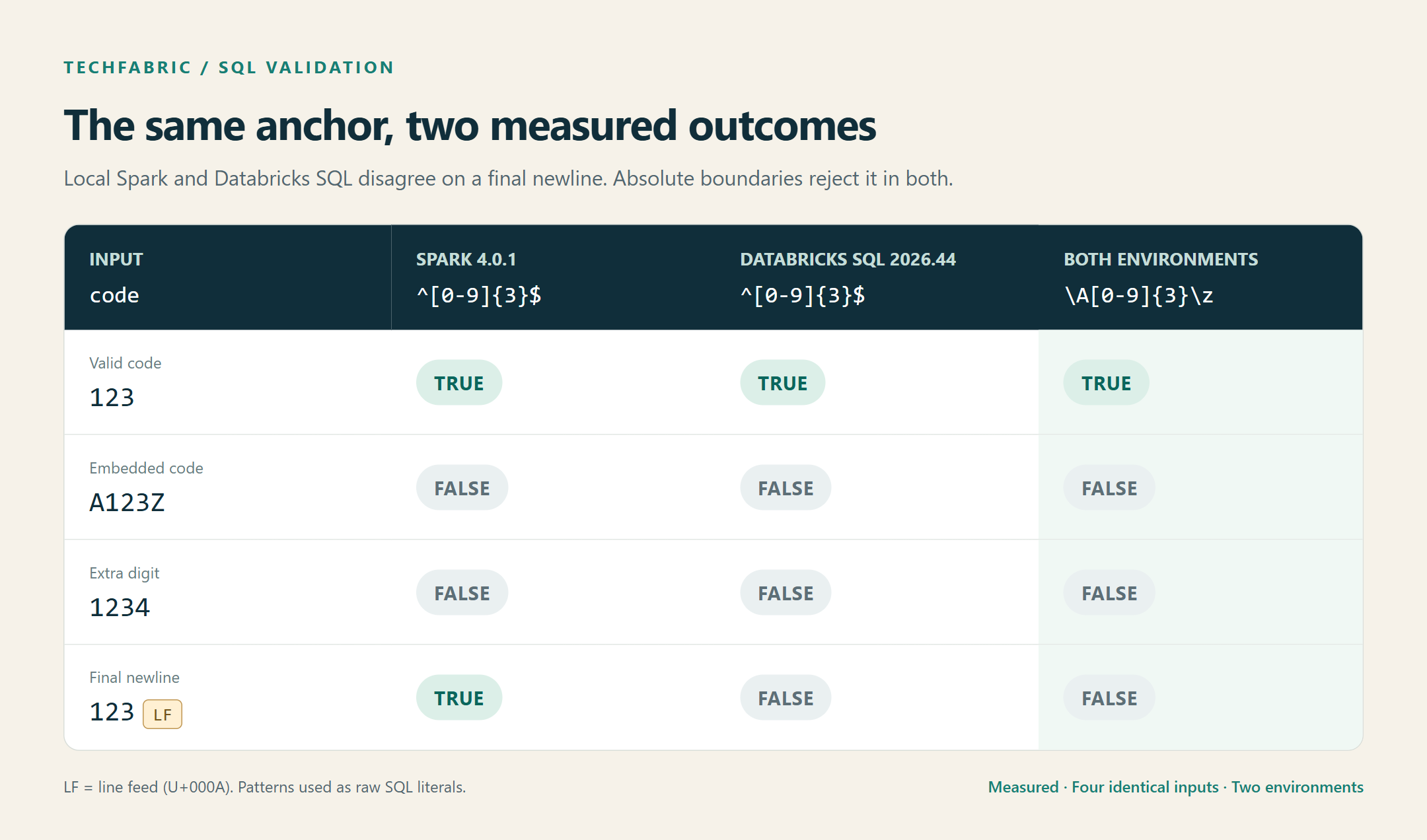
Measured results for the same inputs in Spark 4.0.1 and Databricks SQL 2026.44.
An unanchored pattern accepted an embedded code and an extra digit in both environments. We'd keep these cases in the validation tests when changing engines. This comparison establishes the observed difference; it doesn't identify the engine implementation responsible for it.
Trimming whitespace before checking would change which codes qualify, so we'd agree that behavior with the data owner. The r prefix in the corrected SQL preserves the pattern's backslashes. When using literals, Databricks says to use raw literals "to avoid escape character pre-processing".
Integer conversion and invalid text
A cast converts a value to another data type. ANSI mode controls whether certain invalid conversions raise errors. Our original rule ran with that mode disabled, so malformed number text became NULL; enabling it made the cast fail. A numeric comparison can also convert text implicitly, producing the same problem. Databricks SQL ANSI behavior.
We'd record the setting with the test results because it differs between a SQL warehouse and a Spark session. Databricks Runtime configuration.
| Execution environment | ANSI setting |
|---|---|
| Databricks SQL warehouse | ANSI_MODE |
| Spark session in Databricks Runtime or local Spark | spark.sql.ansi.enabled |
For the string-to-integer conversion, try_cast returns NULL for malformed or out-of-range input. That lets the validation query continue, while coalesce explicitly rejects the failed conversion. Unsupported source/target type combinations can still raise errors. Databricks try_cast reference.
SELECT
  case_id,
  coalesce(code RLIKE r'\A[0-9]{3}\z', false) AS code_ok,
  coalesce(try_cast(quantity_text AS INT) > 0, false) AS quantity_ok
FROM raw_values;
With ANSI mode disabled, the ordinary cast converted the string '1.5' to 1, allowing a fractional quantity through. Casting that same string with try_cast returned NULL, which the corrected rule rejected. The input type matters: converting an already numeric decimal to an integer can discard its fractional part. Databricks cast reference.
The corrected rules rejected all eleven invalid rows and accepted both valid orders under each ANSI setting. The code check covers the agreed format; the quantity check covers conversion and range. Together they give the error report a result for every order in the test.
The mechanism that enforces the rule
The action on failure determines whether a bad order reaches a report. A Delta table's CHECK constraint blocks a violating write. A Lakeflow expectation is a rule applied during pipeline processing, with a chosen action on failure. Warn keeps invalid rows, drop removes them and fail stops the pipeline run, which Databricks calls an update. A report query lists records and does nothing else, so we'd give its results an owner who can stop processing or arrange a repair.
To see what each mechanism does with an unknown result, we used a simpler rule that a value is greater than zero. We tried it on 1, 0 and a missing value in the same Free Edition workspace, with each Lakeflow action as a separate update of a serverless pipeline on November 10, 2026. The first row of the table comes from the order test above.
| Mechanism | Rule returned FALSE | Rule returned NULL | Rule returned TRUE |
|---|---|---|---|
| Negated SQL error query | Row listed | Row missing | Row not listed |
Delta CHECK constraint |
Insert rejected | Insert rejected | Insert accepted |
| Lakeflow expectation, warn | Row kept | Row kept | Row kept |
| Lakeflow expectation, drop | Row removed | Row removed | Row kept |
| Lakeflow expectation, fail | Update failed | Update failed | Update completed |
The constraint and the drop and fail actions treated an unknown result as a failure. Each failed update reported an expectation violation and showed the record that broke the rule, which tells the owner what to repair. With the corrected order rules as the expectation, drop kept the 2 valid orders out of 13 and warn kept all 13. We didn't record the violation counts that warn and drop report, so this run shows which rows reached each table but not how the pipeline counted them.
For a CHECK constraint to be satisfied, Databricks says "it must evaluate to true". The expectations page says the constraint clause "must evaluate to true or false for each record". That's why we'd keep the corrected rule, which always returns true or false, and rerun these three inputs after a platform upgrade.
We'd start with a rule and test inputs that include valid orders and deliberate violations. We'd run them in Databricks and compare expected and actual results. A mismatch sends the rule back for revision; a match lets us enable the chosen action on failure.
Start with one required field that feeds an important report. Keep a valid value beside missing, empty and malformed values, including a final newline or a number too large to convert. Then check which rows the actual table or pipeline accepts or blocks before expanding the rule set.
Frequently asked questions
Does coalesce make a cast safe?
It supplies a replacement for a null result. It doesn't catch an exception from an ordinary cast, so we'd use a supported try_cast conversion when invalid input should become a reportable violation.
What do CHECK constraints and Lakeflow expectations do with a NULL result?
In our Free Edition run, a CHECK constraint rejected the insert, and an expectation set to drop or fail removed the row or stopped the update. Warn kept the row, as it keeps every invalid row, so we'd give its metrics an owner who reads them.
How would we handle an optional field?
We'd explicitly allow absence and validate the format when a value is present. An empty string is a separate input, so we'd decide whether it means absence or a format error and test that decision.