

When Images 2.6 arrived, we exported six diagrams and six icons in Playground with the gpt-image-2.6-flare and gpt-image-2.6-sunburst models to see how the files handled ordinary edits. The diagrams got label changes. The icons got a new fill. We used Python to compare the geometry before and after. OpenAI's Flare model · OpenAI's Sunburst model
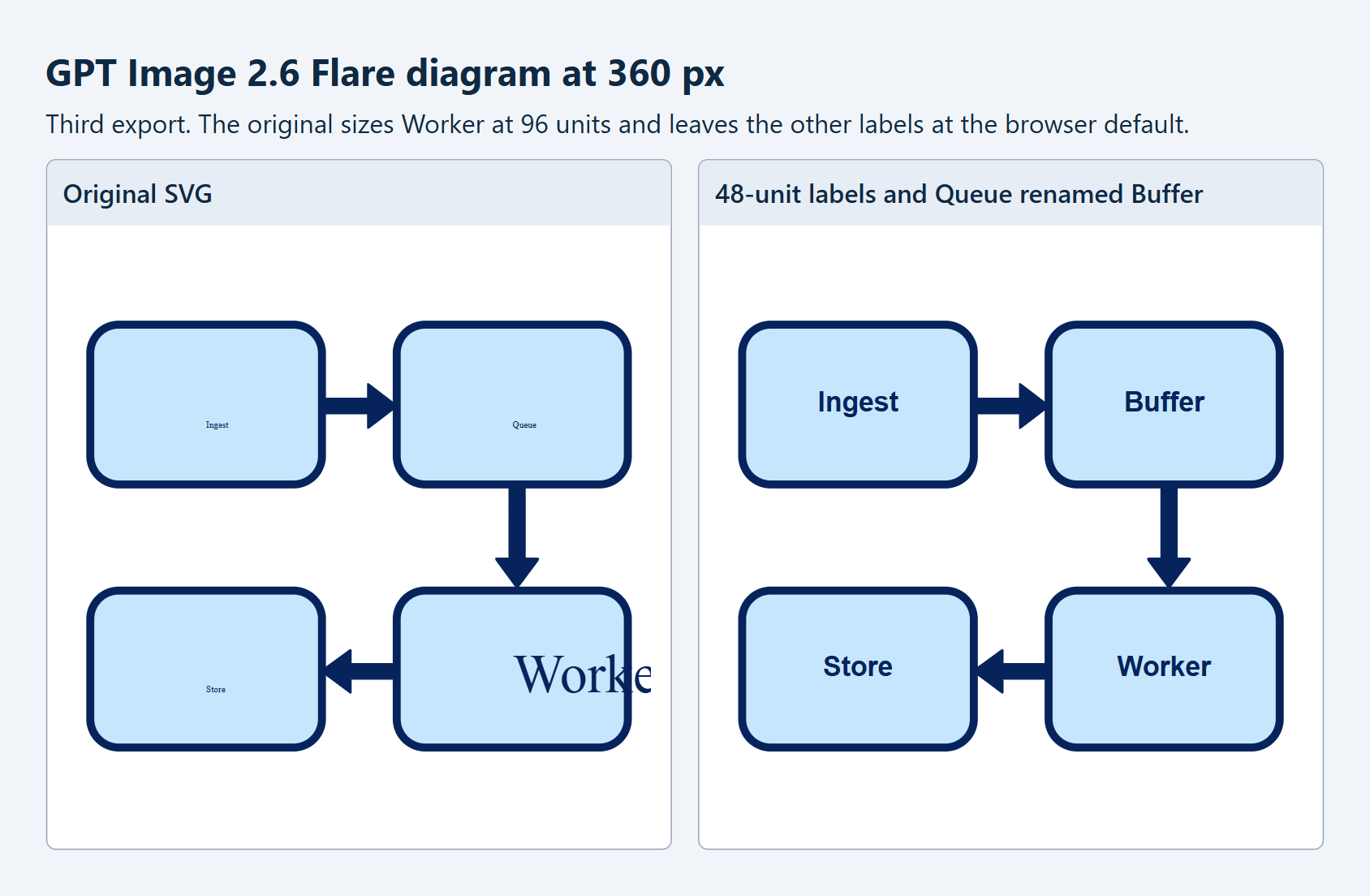
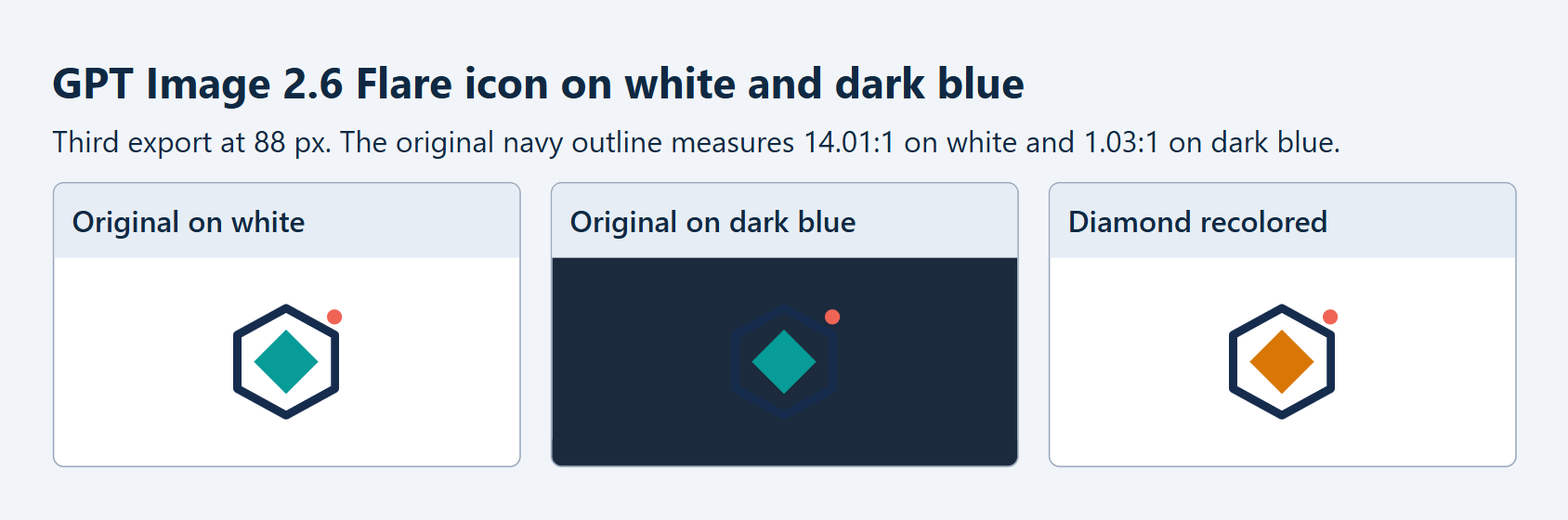
Queue became Buffer in all six diagrams with the boxes and arrows intact. The icon shapes held through all six recolors, too. In Edge, one Flare diagram clipped its Worker label at 360 pixels. Using the icon's outline color and the dark blue background, we calculated a contrast ratio of 1.03:1.
We would review the SVG and its render together before merging. The geometry comparison catches an unintended move. The render shows whether a label or outline is readable at the size and against the backgrounds people will see.
What SVG export changes
A PNG stores pixels. If a diagram label is baked into those pixels, changing the word means painting over it or rebuilding that part of the image. An SVG can store the label as text and the boxes and arrows as separate shapes. That gives you something a script or vector editor can change directly. W3C SVG text specification
Before this export option, turning a raster export into vectors took a separate step. Illustrator's Image Trace, for example, converts raster art into editable paths. OpenAI added SVG output with Images 2.6. The API creates a reference image and uses it to produce SVG markup in the same request, so you can start reviewing the vectors as soon as the export arrives. Adobe Image Trace guide · OpenAI Images 2.6 announcement · OpenAI SVG output guide
Twelve exports with matched settings
We gave Flare and Sunburst the same two briefs. The app icon called for a navy hexagon outline, a teal diamond and a small coral dot. The diagram called for four rounded boxes in a two-by-two grid, with arrows from Ingest to Queue, Queue to Worker and Worker to Store.
We ran each brief three times per model in OpenAI Images Playground, using a 1024 × 1024 canvas and a transparent background. Quality and complexity were both set to medium, and GPT-6 Astra wrote the SVG at low reasoning effort. The Image API creates a reference image and uses it to produce the SVG, so the image model and the model writing the markup are both part of the setup. OpenAI's SVG output guide
The diamond recolor worked across all six icons. We renamed Queue to Buffer in all six diagrams and checked that the boxes and arrows kept their original geometry.
The diagram at 360 pixels
All six diagrams contained the four exact labels as SVG <text> elements. Five left the size to the browser. In the third Flare file, Edge used the default for Ingest, Queue and Store but rendered Worker at the file's explicit font-size="96", which pushed the word past the box and off the canvas.
The repair set the label group to 48 units on the 1024-unit canvas and centered each label in its box. It also removed the size on Worker so the word would inherit the group setting. We ran the edit on all six diagrams and compared the box and arrow geometry before and after.
The icon on white and dark blue
All six icons gave the teal diamond the ID diamond. One Sunburst export placed it inside an app icon group. Our first edit script looked only at the top level and missed it. Searching the whole SVG found the nested diamond. The script updated the fill on all six icons.
To try the recolor, save an SVG with a teal shape whose ID is diamond as icon.svg. The search walks into the nested group before it changes the fill.
from xml.etree import ElementTree as ET

tree = ET.parse("icon.svg")
root = tree.getroot()
diamonds = [node for node in root.iter() if node.get("id") == "diamond"]
assert len(diamonds) == 1 and diamonds[0].get("fill") == "#079C98"
diamonds[0].set("fill", "#D97706")
tree.write("icon-edited.svg", encoding="utf-8")
From the hex colors, the navy outline (#152C4D) has a calculated contrast ratio of 14.01:1 on white and 1.03:1 on dark blue (#1C2A3E).
OpenArt's SVG export in practice
OpenArt offers GPT Image 2.6 SVG export in its image creation tool and through its connector. Its guide uses a badge that says "Free Shipping" as an example of a graphic you can request as SVG. With the connector, the exported file goes into the user's OpenArt library. OpenArt's GPT Image 2.6 guide
For a storefront team, the next question is what happens when the offer changes. If the badge keeps its wording as SVG text, a designer can update the wording while keeping the outline and other artwork. Our diagram edit exercised that same property. The smallest placement is also where we would check whether the revised wording still fits.
Where we would use it
Product documentation. If a team renames a service after an architecture page goes live, a writer can update an SVG text label while keeping the arrows. We would review the result at the width of the docs page, where a longer name could overflow. We saw the Worker label clip even though the diagram's connections were intact.
Themed product icons. A dashboard team can use the same icon shape across themes and swap the fill on a named part to match an approved palette. We changed the diamond independently in our test. For a dark theme, we would also review the outline, since the original navy had just 1.03:1 contrast against our dark blue.
Small illustrations with recurring edits. An onboarding team changing its accent color could use a script to update the same named shape across a set of illustrations. Our edit checked the old color before writing the new one, so the script had a way to detect a mismatch. It searched inside groups because one export had nested the diamond.
We would start from the service inventory if the diagram needed to show an exact production topology. That lets the team review each connection against the system it represents. Our experiment started with a visual draft and checked the effect of specific edits.
The Databricks inspection notebook
We exported the SVGs from Playground and stored the originals and run records in a Unity Catalog volume in Databricks. A Python notebook parsed the files and returned their SHA-256 hashes for comparison with the local copies. We edited copies in Python and rendered the comparisons in Edge.
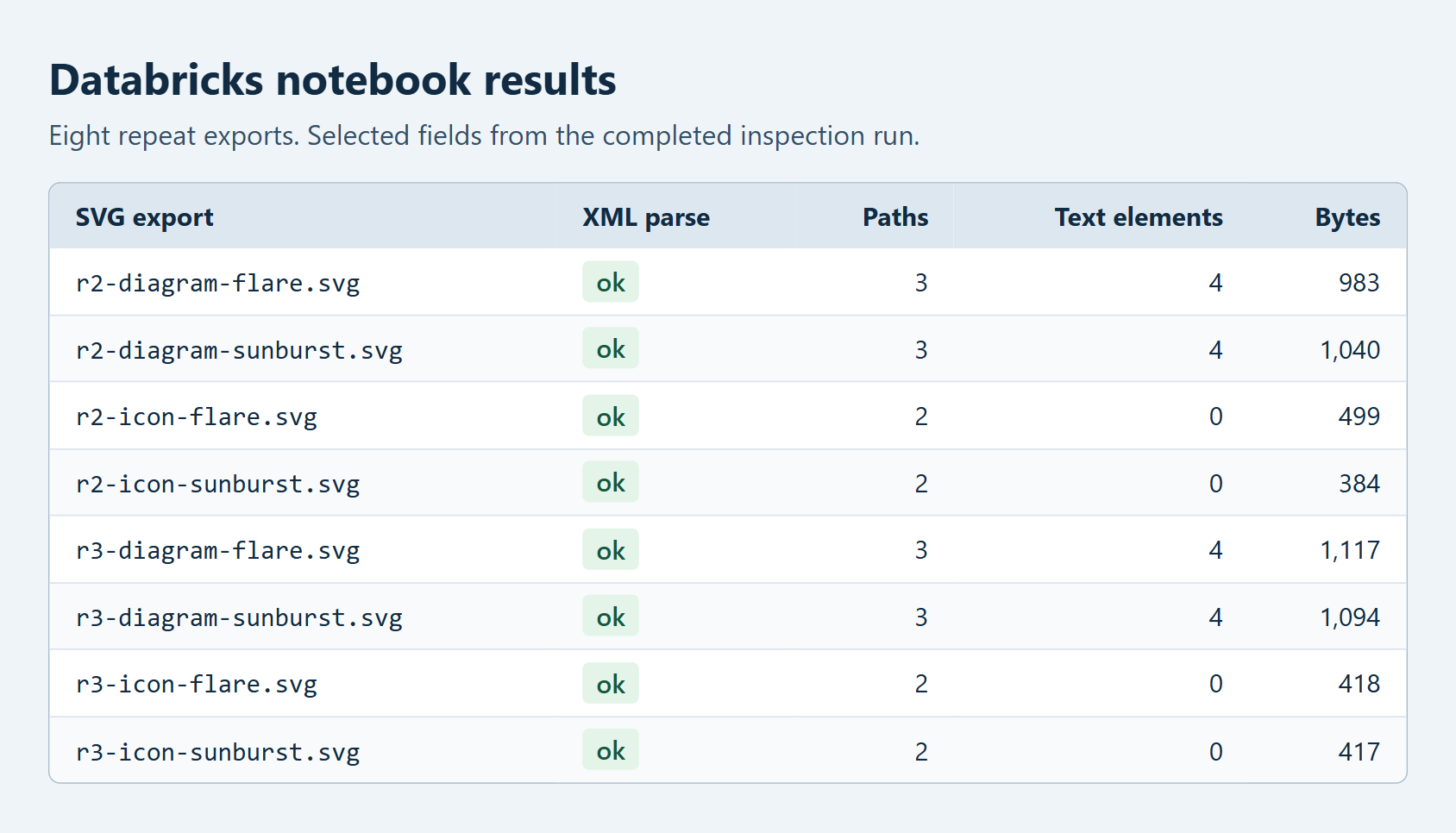
The notebook parsed all 12 files and found no embedded raster images, references outside the SVG document or matches on its active-content checklist. For external uploads, we would also use an SVG sanitizer suited to the way the site embeds images.
All eight files in the Databricks repeat run parsed successfully. Each of the four diagrams had four text elements.
A release check for SVG exports
We would save the original beside the edited copy so a reviewer can see what changed. A diagram review would include a longer label at the narrowest intended width. For an icon, the darkest intended background is a place to check whether the outline still defines the shape.
Frequently asked questions
Does GPT Image 2.6 export SVG files?
Yes. The Image API supports SVG output for GPT Image 2.6. It creates a reference image and returns SVG markup derived from it. OpenAI's SVG output guide
Can you edit text in a GPT Image 2.6 SVG?
Look for <text> elements. All six diagrams in this test kept their labels as text, so we could change the wording in the SVG. If an export draws letters as paths, changing the wording involves replacing the shapes that draw them.
What should you check before shipping an SVG export?
We would try one real edit, such as renaming a label, and render the result at the smallest intended size and on each intended background. For a diagram, a text description also gives readers a way to follow the flow without seeing the arrows.