

Introduction: From Notebooks to Collaborative, Scalable Test Automation
In modern data engineering and analytics, reliable and high-quality data pipelines are mission-critical. Poor data quality can result in faulty business decisions, regulatory breaches, and diminished customer trust. While many teams begin by using Databricks notebooks for exploratory data validation and ad-hoc tests, this approach soon becomes limiting as projects scale and the need for reproducibility, review, and automation increases.
To overcome these challenges, leading QA and data engineering teams use Databricks Repos. Integrating test logic, data quality checks, and orchestration workflows with Git-based repos gets you a higher level of collaboration, version control, and production readiness. This article provides a step-by-step overview of operationalizing data quality testing using Databricks Repos, enabling scalable, maintainable, and team-oriented test automation.
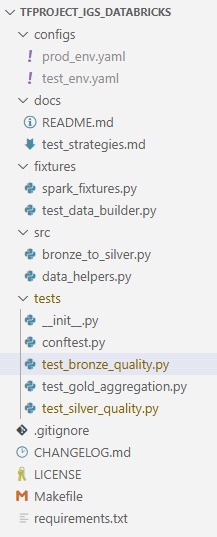
Recommended Databricks Repo folder structure for test automation projects.
Why Move Test Automation to Databricks Repos?
- Collaboration: Team members work from a common, reviewed codebase - eliminating fragmented or orphaned notebooks.
- Version Control: Every change is tracked, reviewed, and can be reverted as needed.
- CI/CD-Readiness: Test logic stored as code, not just in notebooks, is readily automated and integrated with enterprise workflows.
- Reusable Components and Sustainable Code: Modular fixtures, utility functions, and validation logic are centrally organized, simplifying updates and promoting consistent testing standards across projects.
- Separation of Concerns: Notebooks serve as orchestration and reporting layers; logic is maintained in the repo.
Structuring Databricks Repo for Test Automation
A new Git-based repo in Databricks can be created or cloned, with the following recommended directory structure:
- All test logic is stored in tests/.
- Orchestration or data cleaning code is organized in src/.
- Fixtures and helpers are kept in fixtures/.
- Documentation is centralized in docs/.
Writing Modular, Reusable Data Quality Tests
Test logic is written as Python functions in the tests/ folder. Here you can re-use / transfer the tests which were written before in Databricks Notebooks, as we had done it here: %article 1 link%
Similar structures are used for test_silver_quality.py and test_gold_aggregation.py, with appropriate business rules and target tables.
Executing and Reporting Tests in Databricks Notebooks
Importing and Running Test Functions
A Databricks notebook can serve as an orchestrator for data quality checks. The recommended approach involves importing the test modules, injecting the Databricks global spark object, and executing each test, as demonstrated below:
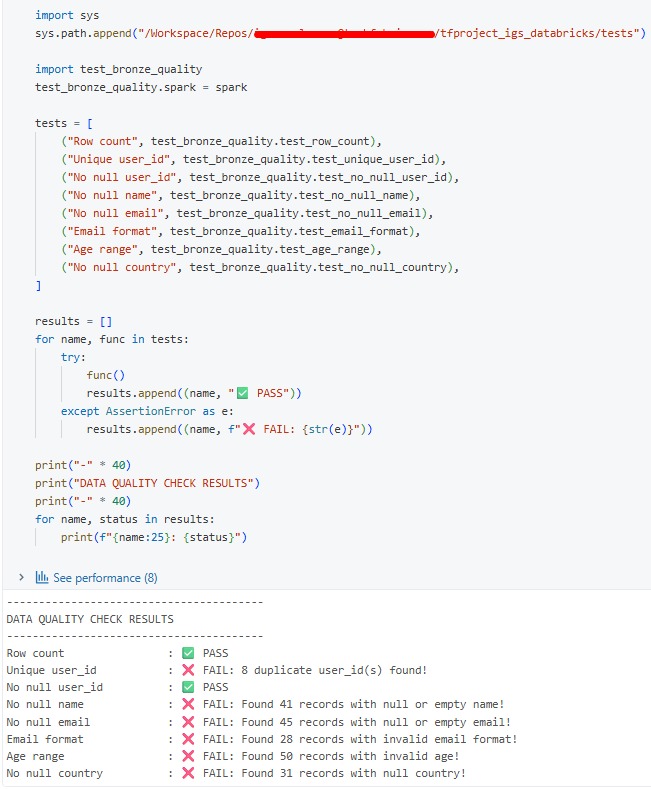
Orchestrating bronze-layer data quality tests from a Databricks notebook.
This approach can be repeated for silver and gold levels by importing the relevant modules.
Sharing and Team Collaboration
- All reusable code is versioned in the repo, accessible to any team member with appropriate permissions.
- Orchestrator notebooks, such as bronze_data_quality_tests, should be moved to /Workspace/Shared for organization-wide visibility.
- Permissions can be managed at the notebook or folder level.
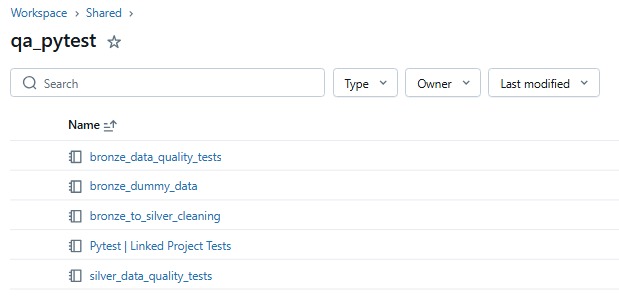
Orchestrator notebooks moved to /Workspace/Shared for team-wide visibility.
- Team members clone the repo into their own workspace and use shared notebooks, ensuring all are using the latest test logic.
Collaboration, Review, and Continuous Improvement
- New tests, improvements, or bug fixes are contributed via Git workflows - branches, pull requests, and code reviews.
- The repository serves as the authoritative reference point for all test automation and quality assurance activities, ensuring alignment and reducing fragmentation across the team.
- Notebooks function as transparent dashboards, while logic and validation live in versioned code.
Team Onboarding and Usage Overview
- Clone the repository (tfproject_igs_databricks) from Git into a Databricks workspace.
- Move or copy orchestration notebooks to /Workspace/Shared for visibility.
- Execute data quality checks by opening a shared notebook and running the provided code cells.
- Contribute improvements by updating test logic in the repo and opening pull requests.
- Optionally, set up Databricks Jobs for automated or scheduled runs, or integrate with CI/CD for further automation.
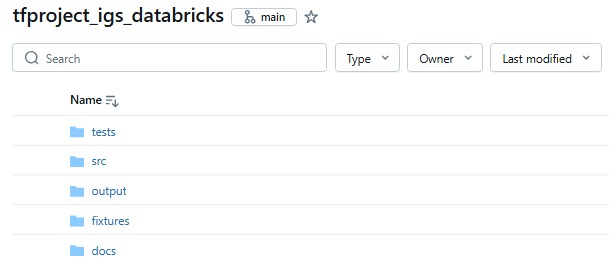
The tfproject_igs_databricks repo synced via Databricks Git integration.
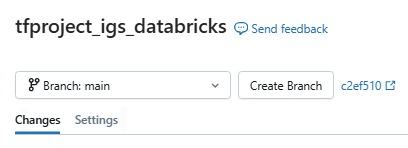
Team members can branch directly from the Databricks Git panel.
Benefits and Path Forward
- Team-Driven Quality: Logic is accessible, reviewed, and reusable.
- Scalability: New tests, layers, and data domains can be added by extending the repo.
- Production-Readiness: This structure serves both interactive QA and future CI/CD or scheduled automation with minimal adjustments.
- Onboarding Simplicity: New contributors are ready to participate quickly - clone the repo, access shared notebooks, contribute improvements.
- Automation Potential: HTML reports, alerting, and management dashboards can be layered on as requirements grow.
Conclusion
Operationalizing data quality testing through Databricks Repos offers QA and data engineering teams a reliable, collaborative, and scalable workflow. By separating logic from orchestration, adopting code review and version control, and using the shared workspace, organizations are better positioned for automation, auditability, and rapid onboarding. As data needs and teams grow, this approach supports both interactive exploration and production-grade automation, enabling high-quality data, every day.
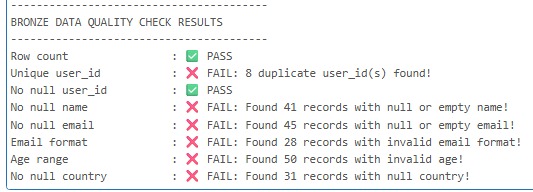
Sample bronze-layer data quality check output.
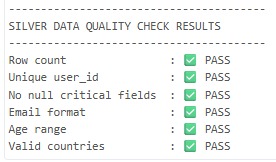
Silver-layer checks confirm cleansing succeeded, with all tests passing.
A repo of checks is how a team keeps a pipeline honest. A workspace whose jobs, clusters and Unity Catalog coverage have drifted is a different problem, and that is the Databricks Health Check.