

Updated by the TechFabric editors in October 2026, with the components of a horizontal layer, a comparison with vertical AI and the trade-offs added to John Bellaud's original argument.
Count the AI assistants in a typical mid-sized company in 2026. One in the CRM, one in the ERP, one in the helpdesk, one in the office suite, one in the code editor, and a chatbot somebody in marketing set up with a credit card. Each sees only its own system. Each has its own permissions model, its own logs, and its own bill. None of them can answer "which of our top 20 customers have an open complaint and an overdue invoice?", because that question spans three systems and no single assistant can see them all.
That's vertical AI, AI added to one application to help with tasks inside it. Horizontal AI is a shared intelligence layer that sits across the business, reads from every system through one governed route, and serves many uses from the same foundations. Businesses need that layer because their most useful questions and processes cross departmental lines, and assistants confined to one system can't follow them.
Vertical AI and horizontal AI
Company A wants AI to automate client profiles and sales recommendations. Company B wants it to plan field service routes. Both buy or build a tool for that one job, and both get some value. Their mistake is treating each tool as a standalone purchase, when the next five use cases need the same pieces. Each will want access to the data, permissions, a model, monitoring and someone who owns it.
| Vertical AI | Horizontal layer | |
|---|---|---|
| Scope | One application or workflow | Across systems and departments |
| Data it sees | The host application's | Whatever it's permitted to, from any connected system |
| Time to first value | Days, often just a licence | Weeks to months for the foundations |
| Cost of the fifth use case | About the same as the first | Much less than the first |
| Governance | One per vendor | One set of permissions, logs and policies |
| Best for | Tasks that live inside one tool | Questions and processes that cross tools |
Both have their place. The right answer for most companies is a horizontal layer for cross-system work, with vertical copilots kept where the task really does live in one application.
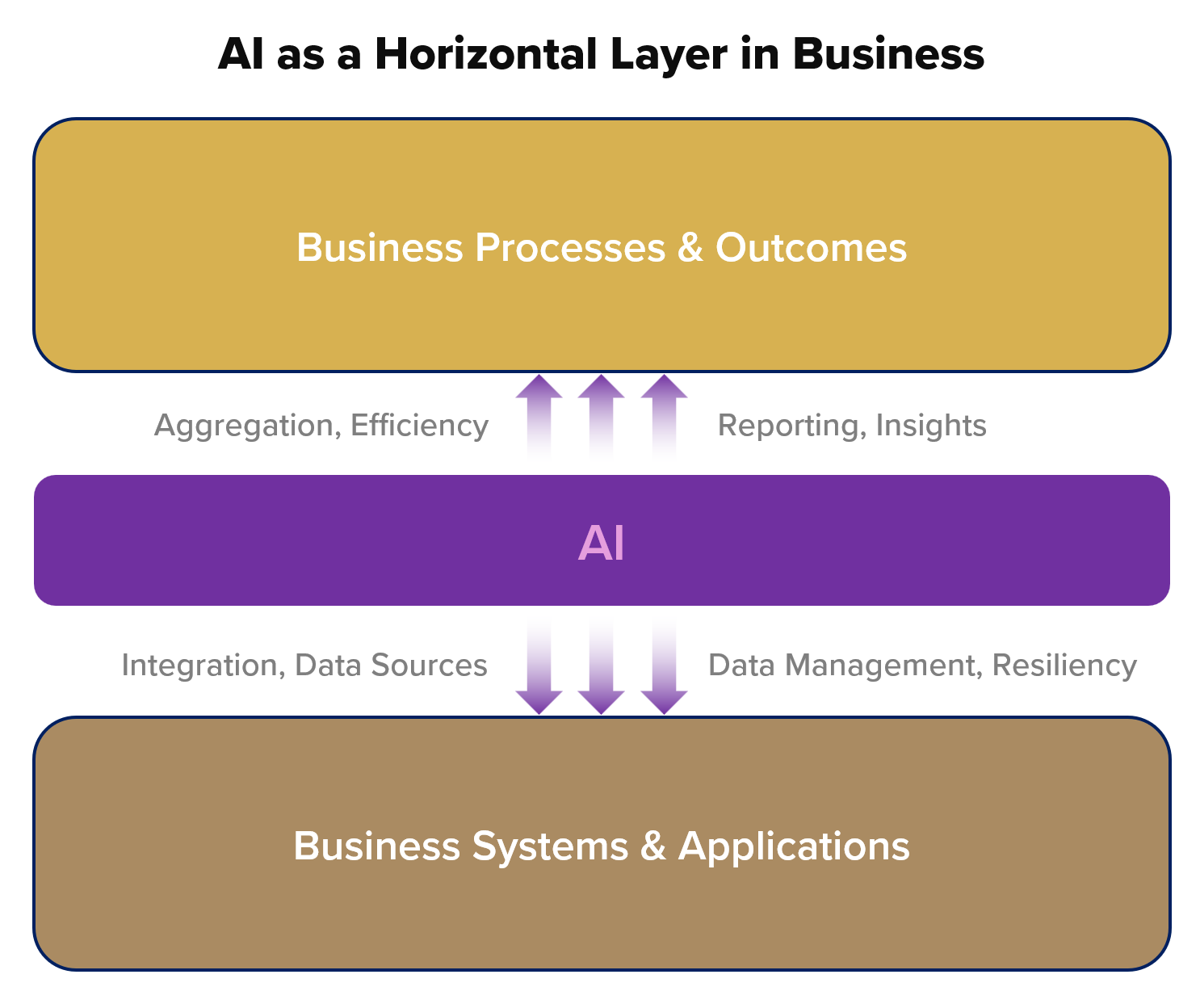
What's actually in the layer
"Horizontal layer" can sound like an abstraction. It's five concrete components, each something you can build or buy.
1. One governed route to the data. The ERP, CRM, helpdesk and the rest copied or connected into one place with consistent definitions and access control, such as a lakehouse like Databricks or a warehouse like Snowflake. This is most of the work and most of the value. If "customer" means different things in the CRM and the ERP, every AI built on top inherits the disagreement.
2. Permissions that follow the user. When a sales rep asks a question, the answer should only draw on data that rep may see. The layer has to pass the user's identity through to the data, rather than letting the AI query everything under one service account. Unity Catalog's row filters and column masks, or the equivalent in your platform, do this once for every use case.
3. A model gateway. One place every application calls models through, such as Databricks Unity Gateway, the AI gateway in Azure API Management or Cloudflare AI Gateway. It handles keys, rate limits, logging and cost tracking, and lets you change model or provider without touching each application.
4. A catalog of tools. For AI to act, not just answer, it needs callable operations like "look up order", "create ticket" or "check stock". The Model Context Protocol (MCP), which Anthropic published in November 2024 and most major vendors now support, has become the common way to describe these. Define a tool once and every agent and assistant in the layer can use it under the same permissions.
5. Evaluation and logging. A shared record of what each AI was asked, what it read, what it did and whether it was right, plus test sets for each use case. This is what lets you say yes to the next use case with evidence, and what an auditor will ask for.
TechFabric took this approach in 2024 with Fiber Copilot, a multi-tenant, multi-model platform we built for standing up assistants for clients. Our post on how we designed it covers the architecture.
A practical example: retail inventory
Picture a retailer with hundreds of stores and a large online business. A vertical approach puts a forecasting tool on the inventory system to predict demand per store. It helps, and it stops at the edge of that system.
With a horizontal layer, the same forecasting model reads point-of-sale data from every channel, supplier lead times from procurement, and local events and weather from external feeds, through the one governed route. Then other uses build on what's already there:
- Replenishment. Forecasts drive draft purchase orders, reviewed by a buyer before they're sent.
- Pricing. Markdown recommendations use the same inventory and demand data, so a store isn't discounting something the forecast says will sell.
- Recommendations online. Suggestions only show products in stock near the customer.
- Customer service. An assistant answering "when will this be back?" reads the same inventory and purchase-order data as the buyers.
None of these is new on its own. The difference is that the second, third and fourth reuse the data connections, permissions, tools and monitoring built for the first, so each one takes weeks instead of being a new project.
Moving beyond single-application copilots
Copilots inside one application help with tasks in it, such as drafting a reply in the helpdesk or summarising a deal in the CRM. That's real value and often the cheapest way to start.
Customer service shows where they stop. A helpdesk copilot drafts responses. A horizontal layer can also notice that a third of this week's complaints mention the same product batch, check the batch in the ERP, and alert quality and logistics, because it can see the systems those teams use. The value is in the connection across systems, which is exactly what a copilot inside one application can't make.
What it costs, and what goes wrong
The trade-off is up-front work. The data foundation takes weeks to months, and until it exists a horizontal layer delivers less than a vendor's copilot that works on day one. Companies that try to build the whole layer before shipping anything tend to stall. The approach that works is to build the layer through the first use case: connect the systems that one use case needs, with permissions and logging done properly, then extend for the next.
The other common failure is ownership. A shared layer that belongs to no team decays, so decide early who runs the gateway, the tool catalog and the evaluations. Usually that's the data platform team, with each business function owning its own use cases.
When vertical is the right call
Keep or buy a vertical copilot when:
- the task really does live inside one application, such as writing code in the IDE or drafting a document in the office suite;
- the vendor's copilot already has access to context you couldn't easily reproduce;
- the data it uses isn't sensitive enough to need your own controls.
Build on the horizontal layer when the question crosses systems, the data needs your permissions, or you expect several use cases on the same data.
Where to start
- List the AI tools already in use, sanctioned or not, and which systems each can see.
- Pick one cross-system question the business asks every week and can't answer quickly.
- Connect only the systems that question needs, into a governed platform, with user-level permissions.
- Put a model gateway and logging in front of it from day one.
- Ship that use case, measure it, and use the same foundations for the next.
AI is becoming a layer that sits across all of a company's systems and data, the same way databases and the web did before it. The companies that treat it that way spend their second year adding use cases instead of reconciling assistants. If you'd like help choosing the first one, see our AI workflows page or talk to us.
Frequently asked questions
Do we have to retire the copilots we already pay for once the layer exists?
No. Keep them where the task lives in one application. A copilot in the IDE or the office suite has context you couldn't easily rebuild, so it stays.
What if our systems define "customer" differently?
Settle the definition before you build anything on top, because the layer won't settle it for you. Every AI on the layer reads the same data, so one disagreement turns up in every answer at once. In practice that means the first use case has to carry the definition work for the systems it touches, and the next use cases reuse it.
Who should own the layer, and what happens if nobody does?
The data platform team usually owns it, and each business function owns its own use cases. If nobody does, the gateway, the tool catalog and the evaluations go stale together. That hurts more than a stale single copilot, because every use case on the layer depends on them.