

Main Article Focus
This article thoroughly covers how QA and data engineering teams can practically implement PyTest to automate data quality checks in Databricks environments, focusing on clear, maintainable, and efficient practices that scale from local notebooks to production CI/CD.
Article Description
This guide demonstrates how QA engineers and SDETs can integrates cleanly PyTest logic into Databricks notebooks to automate data quality verification at every stage of the pipeline. You can learn practical approaches to structuring test code, handling real-world edge cases, and optimizing workflows for reliable, efficient validation of big data in medallion architecture.
Introduction
In large-scale data-driven organizations, poor data quality can cost millions, lead to regulatory fines, or compromise customer trust. The modern data stack, built on platforms like Databricks, enables businesses to extract insights at speed - but only if their data is reliable and trustworthy.
Ensuring this quality is no longer a manual, reactive process. It requires test automation, tight collaboration between QA and data engineers, and frameworks that handle big data on a scale. PyTest, the de facto standard for Python testing, is uniquely suited for this job when harnessed properly in the Databricks environment.
This article is a practical, example-driven guide to implement reliable, maintainable, and efficient data quality checks - directly inside Databricks notebooks using PyTest patterns and real-world data.
Why PyTest for Data Quality?
PyTest stands out for its simplicity, modularity, and ability to scale from unit to integration tests. For data quality, it offers:
- Readable assertions that make business rules and data contracts explicit.
- Powerful parametrization for running the same test logic across multiple datasets or business rules.
- Extensible fixtures for efficient setup/teardown and reusability.
- Rich reporting and integration with CI/CD, enabling immediate feedback in a collaborative team setting.
- Graceful error handling, essential for dealing with real-world data unpredictability.
With PyTest in Databricks, QA and data engineers can:
- Shift left - detect data issues earlier in the pipeline, even during development.
- Share a common test language and toolkit across teams.
- Build tests that evolve with data and business logic, not against them.
Writing Thorough Data Quality Tests: Principles & Practical Examples
0. Before we begin, we need some data to apply the tests to
For this purpose, I'll create some imperfect data that contains errors. In your case, you can use your own test data or real project data.
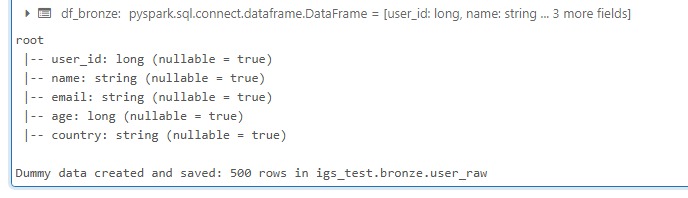
Generating imperfect sample data to exercise the data quality tests.
1. Now we're ready to structure Data Quality Tests (Bronze Layer)
I recommend writing each check as a function, with strong docstrings and precise error messages.
Under the functions, you can call each function in a code block to see a check-specific report:
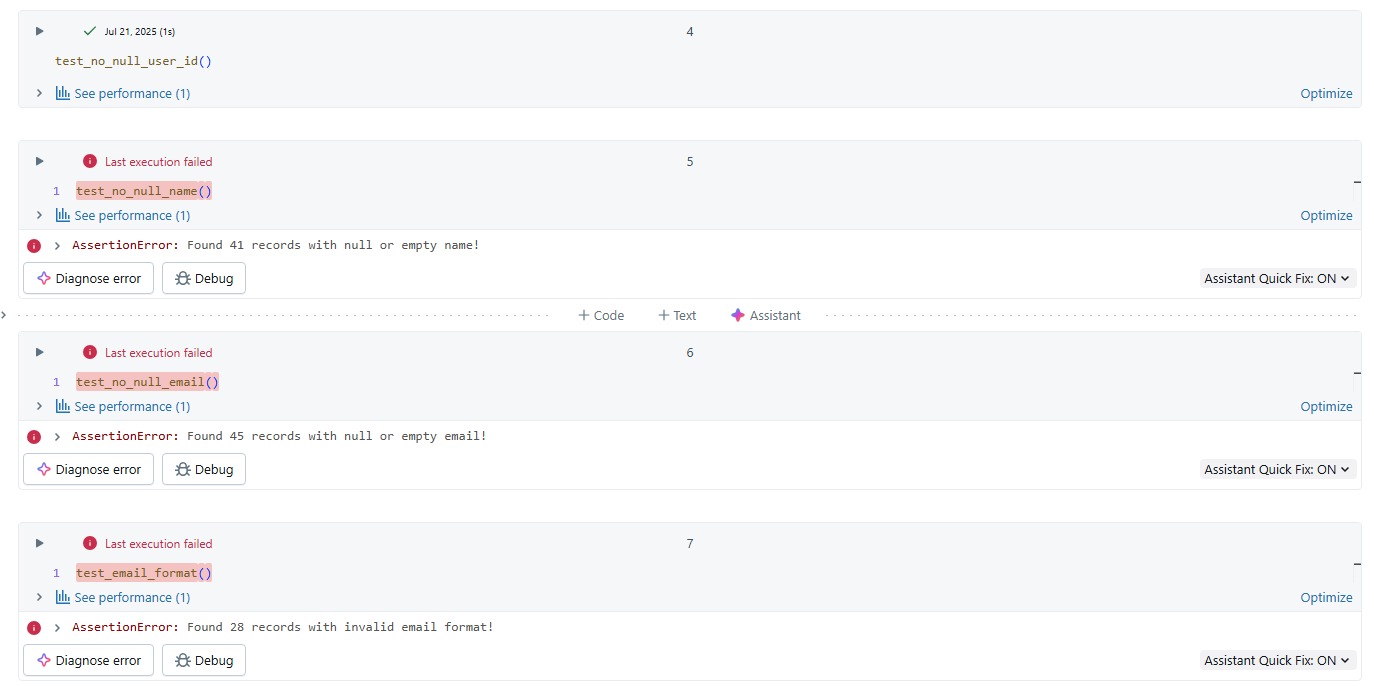
Individual check functions surface precise, business-readable failure messages.
Or group-up the function calls, to see the full report:
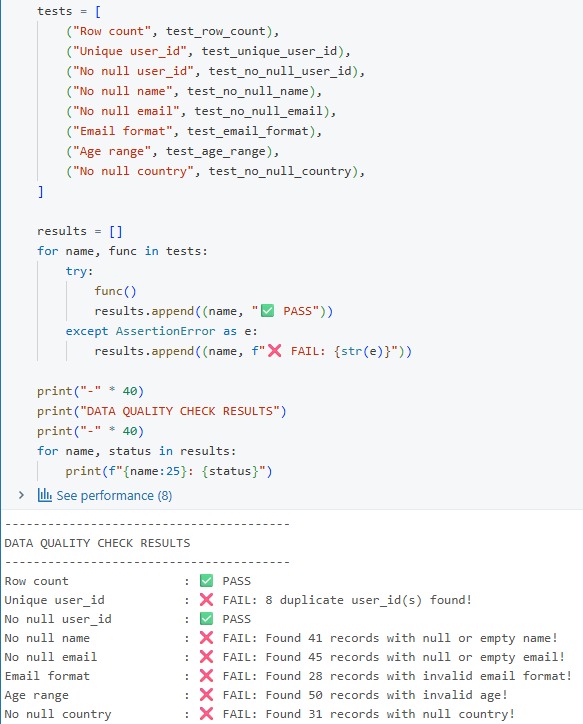
Grouping check functions together produces one consolidated bronze-layer report.
2. With this you should be able to Handle Edge Cases and Failures
- Cover nulls, wrong types, duplicate keys, invalid values.
- Out-of-range ages, bad emails, missing countries, etc.
- Test results quantify exactly how many rows are affected and where.
And one more thing: Use PyTest fixtures and function arguments for setup and reusability!
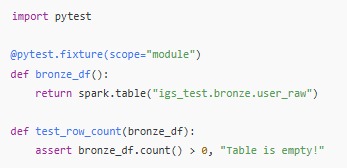
Using PyTest fixtures for reusable setup across data quality tests.
3. Cleansing Data: Bronze to Silver Promotion
Based on your verification logic, you understand what cleansing data actions must be applied to the table data. In our case, cleansing can be done like this:
4. Silver Layer Checks: Confirm Cleansing Worked
It's not done yet, you still have to confirm the cleansing worked successfully and the data you have is reasonable and valid from the business perspective. For this, we create quite similar checks as we did for the bronze layer, and ensure the data we have is corresponds with your business needs.
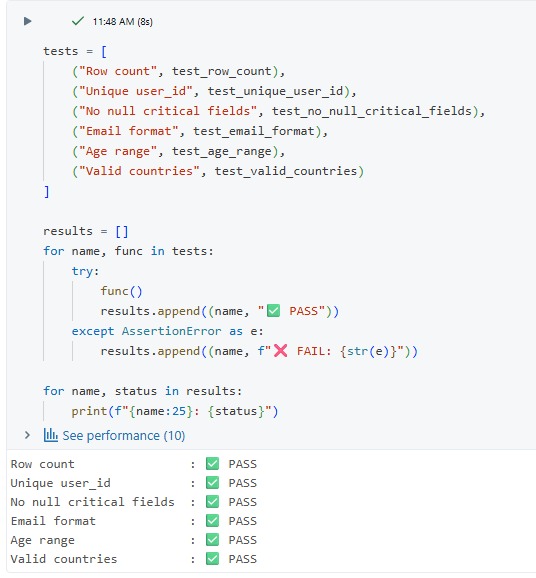
Silver-layer checks confirm the cleansing logic worked as expected.
5. Reliability and Error Handling
- Catch and log assertion failures.
- Use explicit, business-readable messages for every check.
Example:
try: test_unique_user_id() except AssertionError as e: print(f"Data quality failure: {e}")
Conclusion
Integrating PyTest-style data quality checks directly into Databricks notebooks creates a scalable, maintainable foundation for reliable analytics. By automating validation at every pipeline layer, QA and data engineering teams can surface data issues early, accelerate remediation, and confidently deliver business insights.
But the value of automated testing doesn't end in a notebook. The next level is to embed these checks into your team's daily workflows and continuous delivery pipelines. To see these further data improvements and integration stay tuned with our Techfabric blog.
Final Thoughts
By integrating PyTest-driven validation into Databricks and your wider DevOps practices, you transform data quality from an afterthought into a daily, automated habit - ensuring that every insight and decision is built on trusted data.
When the question is whether a model or a Genie answer is better than last week's, the same instinct lives in TechFabric Experiments. When the question is what the workspace is spending to produce those answers, start with the Databricks Health Check.
Frequently asked questions
Should the silver checks be the same as the bronze ones?
Mostly yes. I write them as quite similar checks, but they ask a different question: bronze tells you what is wrong, silver tells you the cleansing removed it. The cleansing step comes from what the bronze checks found, so a rule that never made it into the bronze report won't be cleansed or confirmed in silver. Add the business-validity checks at silver, because the data can be clean and still not match what the business needs.
If I wrap a check in try/except, does the notebook still fail when the data is bad?
Not in the example. It catches the AssertionError and prints the message, so the cell finishes and the failure shows only in the output. In a notebook that's the point, since every check leaves a readable message. Embedding the checks into your daily workflows and delivery pipelines is the next level, and this post leaves that for a later one.
Can I run these checks on real project data instead of the dummy set?
Yes, you can use your own test data or real project data. I'd still keep a small imperfect set next to it. A check that passes on real data might be correct, or it might be a check that can't fail, and the bad rows in the dummy data are how you tell the difference.
How do I see how many rows a failed check affects?
Put the count and the location in the check's error message. Each check is its own function, so every one reports its own number when you call it in a cell. When you group the calls into the full report, you get those counts side by side for the layer, which tells you which problem to cleanse first.