# The effects of Cypress component testing on your React app
> Cypress component testing catches a broken React form in a test that runs in about a second, long before QA. A working setup on Vite, and when to use it.
Published: 2024-10-23 · Updated: 2026-10-11
Author: Ihor Seleznov
Tags: Knowledge Share, React
Canonical: https://www.techfabric.com/blog/the-effects-of-cypress-component-testing-on-your-react-app
---
A broken form or a missed callback in a React app is often found late, when a QA engineer meets it in a full build. Cypress component testing moves that check to the developer who just built the component. It mounts a single React component in a real browser, with no running app, no backend and no login, and lets you click, type and assert against it with the same commands you'd use in an end-to-end test. The payoff is a test that runs in about a second, so the bug no longer waits for a full build to be found.
_Updated by the TechFabric editors in October 2026. Ihor Seleznov's original 2024 walkthrough used Create React App and Cypress 13; its code is still in [his GitHub repository](https://github.com/efet11/Techfabric.CT), and the Vite setup below replaces it. Versions and behaviour were checked against the Cypress, React, Playwright and Vitest documentation and npm on 11 October 2026._
## Why the Create React App setup no longer works
The 2024 version of this post started from Create React App, and that route now fails.
- The React team [deprecated Create React App for new apps on 14 February 2025](https://react.dev/blog/2025/02/14/sunsetting-create-react-app), pointing people at a framework or at a build tool such as Vite.
- Cypress 14 then dropped it. The [migration guide](https://docs.cypress.io/app/references/migration-guide) says "create-react-app is no longer actively maintained or supported", and component tests now need a real bundler, so a CRA project has to eject to webpack or move to Vite.
- The same release raised the minimum React version for component testing to 18. Cypress 15 then dropped Vite 4 and webpack 4, and Cypress 16 dropped Vite 5, 6 and 7, so `@cypress/vite-dev-server` now needs Vite 8. The [current docs](https://docs.cypress.io/app/component-testing/react/overview) list React 18 and 19, with Vite 8, webpack 5 or later, or Next.js 15.0.4 and later and 16.
The setup uses Vite 8 (the current `npm create vite` template) with Cypress 16, which needs Node 22, 24 or 26 and later; check `node -v` first.
## How component testing fits
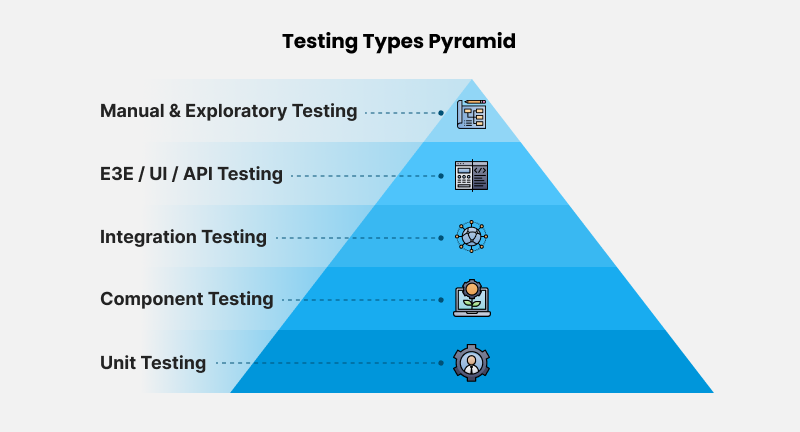
Component testing sits between unit tests, which call a function with values, and end-to-end tests, which drive the whole deployed app. It renders a real component with real props and checks what a user would see and do. Defects it finds are usually fixed on the spot by the developer, without ever becoming a ticket, which is where the saving on bug fixing comes from.
## Build a small React app
Create the app with Vite and start it:
```bash
npm create vite@latest user-profile -- --template react
cd user-profile
npm install
npm run dev
```
Vite serves it on `http://localhost:5173`. Add two components under `src/components`. The first displays a profile:
```jsx
// src/components/UserProfile.jsx
export default function UserProfile({ user, onEdit }) {
return (
First name
{user.firstName}
Last name
{user.lastName}
Email
{user.email}
);
}
```
The second edits it, holds its own state, and reports back through a callback:
```jsx
// src/components/EditUserProfile.jsx
import { useState } from "react";
export default function EditUserProfile({ user, onComplete = () => {} }) {
const [firstName, setFirstName] = useState(user.firstName);
const [lastName, setLastName] = useState(user.lastName);
const [email, setEmail] = useState(user.email);
return (
);
}
```
Wire them together in `src/App.jsx` with a `useState` for the user and another for edit mode, passing `onComplete` a function that saves a non-null result and leaves edit mode either way. That's all the app needs.
## Add Cypress component testing
```bash
npm install -D cypress
npx cypress open
```
Choose **Component Testing** in the launchpad. Cypress detects React and Vite, checks the dev dependencies it needs (the React adapter itself ships inside the `cypress` package), and writes the configuration.
```js
// cypress.config.js
import { defineConfig } from "cypress";
export default defineConfig({
component: {
devServer: { framework: "react", bundler: "vite" },
},
});
```
It also writes `cypress/support/component.jsx`, which registers the mount command, and `cypress/support/component-index.html`, the page each component is mounted into:
```jsx
// cypress/support/component.jsx
import { mount } from "cypress/react";
import "../../src/index.css"; // add this line yourself: global styles are not loaded by default
Cypress.Commands.add("mount", mount);
```
That import of your global CSS matters more than it looks. Without it, components render unstyled, and a test that asserts something is visible or clickable can pass in Cypress and fail for a real user, or the other way round.
## Write the tests
Specs sit beside the components and match `*.cy.jsx`. The first checks that the profile shows what it was given:
```jsx
// src/components/UserProfile.cy.jsx
import UserProfile from "./UserProfile";
const user = { firstName: "John", lastName: "Doe", email: "john.doe@example.com" };
describe("", () => {
it("shows the user it was given", () => {
cy.mount( {}} />);
cy.get("[data-cy=first-name]").should("have.text", "John");
cy.get("[data-cy=last-name]").should("have.text", "Doe");
cy.get("[data-cy=email]").should("have.text", user.email);
});
it("calls onEdit when Edit is clicked", () => {
cy.mount();
cy.get("[data-cy=edit]").click();
cy.get("@onEdit").should("have.been.calledOnce");
});
});
```
The second checks behaviour, and asserts on what the callback received rather than only that it fired. The 2024 version of this test stopped at "have.been.called", which would still pass if Save sent back the old values.
```jsx
// src/components/EditUserProfile.cy.jsx
import EditUserProfile from "./EditUserProfile";
const user = { firstName: "John", lastName: "Doe", email: "john.doe@example.com" };
describe("", () => {
it("returns the edited values on save", () => {
cy.mount();
cy.get("[data-cy=first-name]").clear().type("Jane");
cy.get("[data-cy=save]").click();
cy.get("@onComplete").should("have.been.calledWith", {
firstName: "Jane", lastName: "Doe", email: "john.doe@example.com",
});
});
it("returns null on cancel", () => {
cy.mount();
cy.get("[data-cy=cancel]").click();
cy.get("@onComplete").should("have.been.calledWith", null);
});
});
```
Run them headlessly, which is what CI wants, with `npx cypress run --component`. `cypress run` is headless by default, and `--component` switches it from end-to-end specs to component specs.
### Why data-cy selectors
The tests select on `data-cy` attributes instead of CSS classes, element types or text. That's Cypress's own recommendation, and the reason is practical. A designer renaming a class or a copywriter changing "Save" to "Save changes" shouldn't break a test whose job is to check behaviour. A `data-cy` attribute exists only for tests, so nobody changes it by accident. If you'd rather not ship the attributes, a Babel or SWC plugin can strip them from production builds.
## The trade-offs
Component tests aren't free, and the choice of runner is a real decision.
**Against React Testing Library on Jest or Vitest with jsdom.** jsdom is fast, and for logic-heavy components it's usually the better tool. It has no layout engine, so it can't tell you an element is hidden behind another, clipped, or zero pixels wide. Cypress runs in a real browser (Chrome-family, Firefox, or WebKit experimentally), so visibility and layout are real, and you watch the test run with time-travel snapshots. The cost is speed. A Cypress run starts the browser and the Vite dev server once, then bundles and mounts each spec in a real page, so a suite of a few hundred component tests takes minutes where jsdom takes seconds.
**Against Vitest Browser Mode.** [Vitest 4.0](https://voidzero.dev/posts/announcing-vitest-4), released on 22 October 2025, marked Browser Mode stable. It runs tests in a real browser through Playwright or WebdriverIO, inside the same runner as your unit tests. For a team already on Vitest, that's now the closest competitor, and it avoids a second test runner.
**Against Playwright.** Playwright has dropped its experimental component-testing packages. Its docs say they've been removed and advise staying on Playwright 1.62 until you migrate, and 1.62.1 is the latest stable `@playwright/experimental-ct-react` release on npm. Its [current approach](https://playwright.dev/docs/test-components) treats a component test as an ordinary end-to-end test against a story gallery page served by your own dev server. Teams already invested in Playwright for end-to-end tests may prefer that to adding Cypress.
**Providers are the usual stumbling block.** A component that reads from a router, a React Query client, a theme or an auth context will throw when mounted alone. The fix is a custom mount command in `cypress/support/component.jsx` that wraps every component in the providers your app uses, written once and reused by every spec.
**What component tests can't cover.** Routing between pages, real authentication, and anything that depends on the backend's actual behaviour belong in end-to-end tests. `cy.intercept` works in component tests and is the right way to stub network calls there, but a stub only proves the component handles the response you invented.
## Where to start
Pick the three components with the most branching behaviour, usually forms, and write one component test for each path a user can take through them. Add `npx cypress run --component` to CI, import your global styles in the support file, and build the provider-wrapping mount before the second spec needs it. The Cypress runner is open source under the MIT licence, so none of this needs a paid plan. Cypress Cloud adds recording, parallelisation and flake detection when the suite is large enough to need them.